Updates (July 2026 to September 2026)
August 2026 — Updated the topic to add information about the virtual patch eligibility and column in the issue listing. For more information, see Issue Listing.
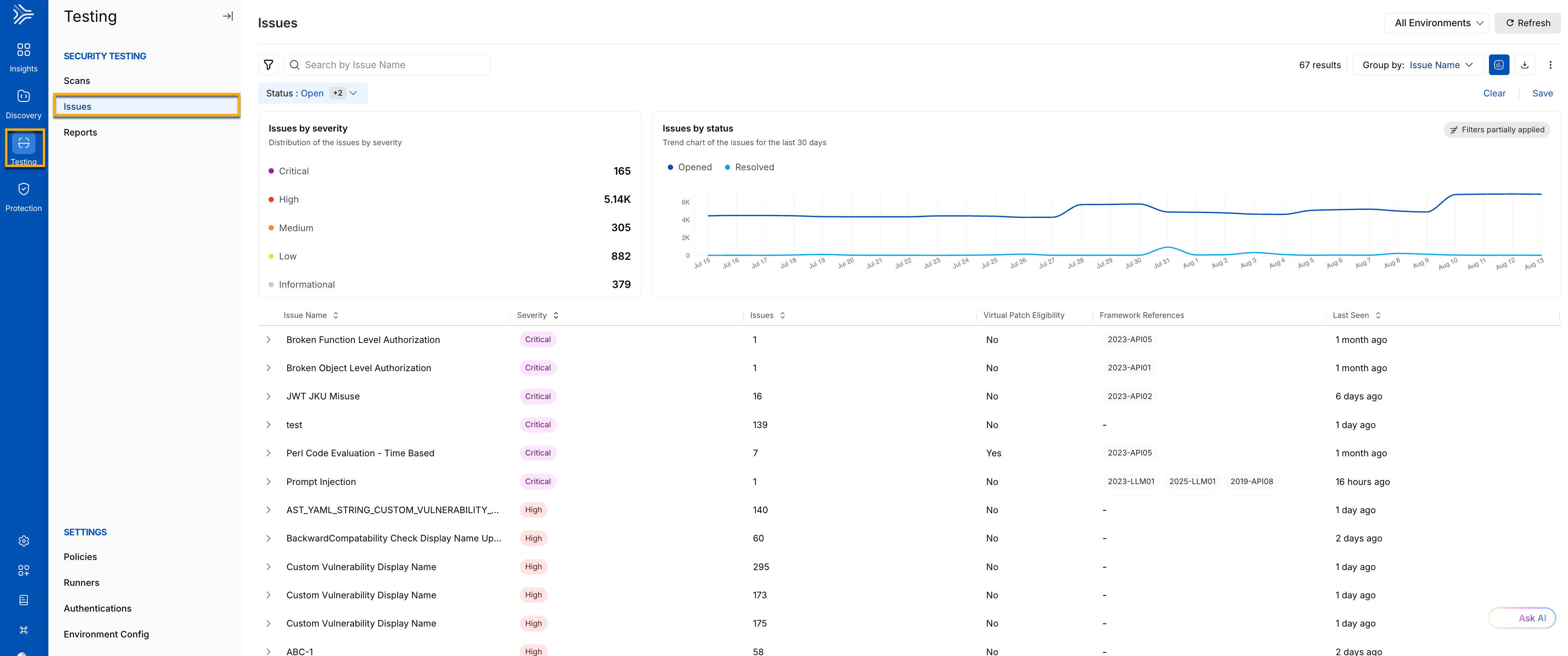
The Issues page serves as your central command center for monitoring API risks identified by Traceable through security testing scans. If you are responsible for the organization’s API security and want to view issues identified via AST scans, you log into Traceable and head over to the Testing → Issues page. This page serves as a hub for identifying all potential vulnerabilities and risky patterns through scans.
Issues
What will you learn in this topic?
By the end of this topic, you will be able to:
What issues are, and how Traceable detects them through AST scans.
How to use the Issues page to review and assess detected security issues.
How to interpret issue severity, status, and other key details in the issue listing.
How to use grouping and filters to organize issues and prioritize findings for investigation and remediation.
How to use additional options, such as search, saved filters, visualization, and issue downloads.
If you already understand these components and wish to learn how to drill down and manage an issue, see Issue Management.
Understand issues
Issues are security gaps in your API definitions that threat actors may exploit to attack your API infrastructure. Traceable identifies API assets, endpoints, including AI endpoints, and services through the discovery process. After discovery, you can configure AST scans to identify issues based on the policies you select. The following table provides an overview of issues and how Traceable detects and manages them:
What are issues? | Why do they matter? | How does Traceable detect them? | What can you do with them? |
|---|---|---|---|
Issues are security gaps in your API definitions that threat actors may exploit to compromise your APIs or application infrastructure. | Issues can expose sensitive data, weaken your API security posture, or allow attackers to compromise application functionality. Identifying and addressing them helps reduce security risks. | Traceable evaluates discovered APIs during AST scans against the configured policies and identifies issues based on the defined security rules. | Review issue details, assess severity and risk, prioritize remediation, and manage issue status. Traceable continues to monitor API endpoints through subsequent scans, even after an issue is resolved. |
For information about setting up a scan and policy, see Creating a Scan and Policies, respectively.
Note
Traceable does not scan APIs for issues while they are in the learning phase.
Issues drill down
The Issues page provides a centralized view of vulnerabilities detected in External and Internal APIs during AST scans. Use the page to review issue severity, understand issue details, investigate risks, and prioritize remediation. For information about drilling down into an issue, managing its status, remediating it, and the rules for resolving or deleting issues, see Issue Management.
Issue severity
Traceable assigns a severity level to each detected issue based on its potential impact and risk to your application ecosystem. The following table lists the severity levels in descending order:
Severity | Description |
|---|---|
Critical | Issues that pose the highest risk and require immediate remediation to prevent significant security breaches. |
High | Issues that may expose sensitive data or compromise system integrity if not addressed promptly. |
Medium | Issues that present a moderate security risk and may weaken your security posture over time. |
Low | Issues with limited impact that can typically be addressed as part of routine maintenance. |
Informational | Findings that do not represent a direct security risk but provide useful context, such as configuration details, exposed metadata, or usage patterns. |
Key components
The page contains key components that help you quickly assess and understand issues. Below are the main elements of the page and their significance:
.png)
Issues Key Components
Visual insights
At the top of the Issues page, Traceable shows the following charts:
Chart | Description |
|---|---|
Issues by Severity | Shows the count of issues by severity (Severity Breakdown). You can click a severity level to filter the results accordingly. |
Issues by Status | Shows a trend of the open and resolved issues over the past 30 days. |
Collectively, the above charts provide an overview of your application’s security health and trends, based on which you can take the necessary actions.
Issue listing
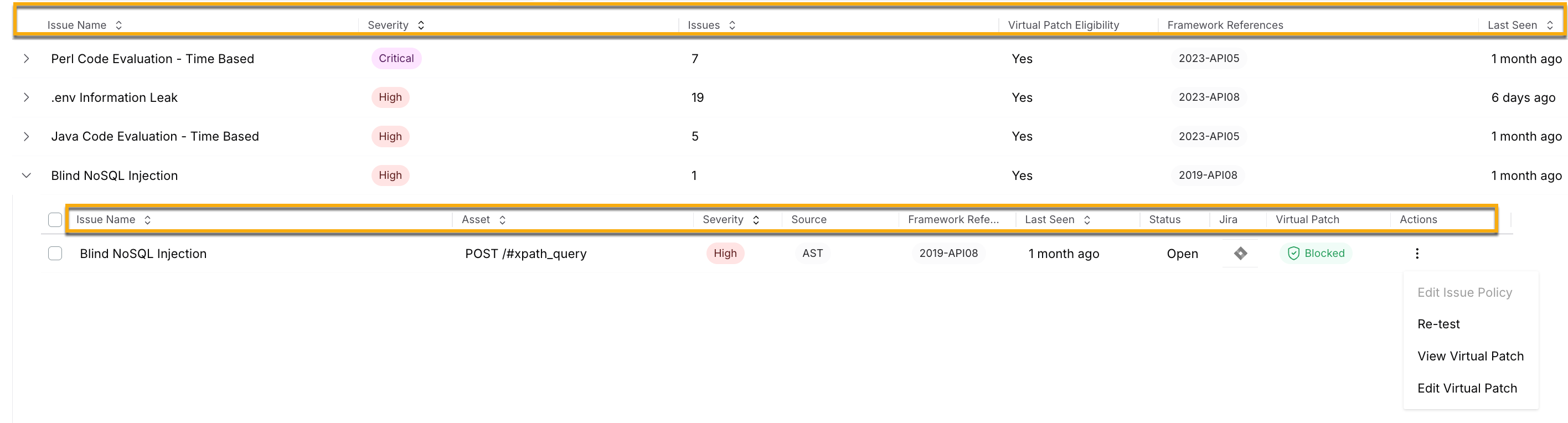
Each entry in the Issues table represents an issue detected during an AST scan. The table groups issues by Issue Name by default and provides key details to help you understand the finding, assess its severity, and determine its remediation status. The following table describes the different attributes and its description:
Issue Listing
The following table describes the different attributes and its description:
Column | Description |
|---|---|
Issue Name | Specifies the name of the detected issue, such as Broken Function Level Authorization, JWT JKU Misuse, or Prompt Injection. |
Severity | Specifies the severity assigned to the issue, such as Critical, High, Medium, Low, or Informational. This helps you assess the potential impact and prioritize remediation. |
Source | Displays information about the origin of the issue, here AST. |
Issues | Specifies the number of individual occurrences detected for the issue. For example, a value of 16 indicates that Traceable detected 16 occurrences of that issue. |
Virtual Patch Eligibility | Specifies whether the issue is eligible for a virtual patch. Yes indicates that the issue can potentially be mitigated using a virtual patch. |
Framework References | Specifies the security framework references associated with the issue, such as 2023-API01, 2023-API05, or 2025-LLM01. |
Last Seen | Specifies when Traceable most recently observed the issue. This helps you understand whether the issue is still being detected and how recently it was active. |
Status | Displays the current status of the issue. This serves as a communication medium to indicate whether or not an issue requires prioritization. For more information on the available statuses, see Issue Management. |
Integrations | Displays the Jira icon. This helps you track an issue by creating a Jira ticket directly from the Traceable platform.
|
Actions |
|
If you wish to drill down into an issue and manage it individually according to your requirements, see Navigating the Issues Flow.
Issue filters
Use filters to narrow the list of issues and focus on the findings that matter to you. You can filter issues by their status and severity, the affected API or application, the scan that detected them, and security characteristics such as authentication, encryption, and sensitive data. The following table describes the available filter options grouped by category:
Category | Filter | Description |
|---|---|---|
Issue | Status | Specifies the current status of the issue, helping you identify findings that are open, resolved, or in another stage of the issue lifecycle. |
Severity | Specifies the severity assigned to the issue, such as Critical, High, Medium, Low, or Informational, helping you prioritize findings based on their potential impact and urgency. | |
Framework References | Specifies the security frameworks or standards associated with the issue, helping you relate the finding to specific security requirements or controls. | |
Category | Specifies the security category for the issue, helping you group findings by the type of security risk they represent. | |
Issue Name | Specifies the name of the detected issue, such as Broken Object Level Authorization. Use this to find a specific vulnerability or review occurrences of the same issue type. | |
Created Timestamp | Specifies when the issue was first created, helping you understand when the finding was initially detected. | |
Closed Timestamp | Specifies when the issue was closed, helping you identify findings that were resolved during a specific period. | |
Environment | Specifies the environment associated with the issue, helping you focus on findings from a particular deployment environment. | |
Is AI Asset | Specifies whether the affected asset is identified as an AI asset, allowing you to focus on findings associated with AI APIs and other AI-related assets. | |
Issue Id | Specifies the unique identifier assigned to the issue, allowing you to locate a specific finding or correlate it with an issue referenced elsewhere. | |
Asset | Specifies the asset where Traceable observed the issue, including APIs and AI APIs. | |
Asset Type | Specifies the type of asset affected by the issue, helping you distinguish between different asset types during investigation. | |
Application Name | Specifies the application associated with the affected asset, helping you identify which application may be impacted by the finding. | |
Jira Created | Specifies whether a Jira issue has been created for the finding, helping you distinguish findings that are already being tracked from those that still require a ticket. | |
Jira Issue | Specifies the Jira issue associated with the Traceable finding, helping you locate findings that are already being tracked and managed in Jira. | |
Scan Run | Specifies the AST scan run in which Traceable detected the issue, helping you trace the finding back to the specific scan execution. | |
Scan | Specifies the AST scan associated with the issue, helping you understand which configured scan identified the finding. | |
Virtual Patch Eligible | Specifies whether the issue is eligible for a virtual patch, helping you identify findings that may be mitigated while a permanent fix is implemented. | |
Endpoint | Endpoint | Specifies the endpoint associated with the issue, helping you identify the specific API operation where the security gap was observed. |
API Endpoint | Specifies the API endpoint affected by the issue, helping you identify the API operation that requires investigation or remediation. | |
Service | Specifies the service associated with the affected endpoint, helping you identify the backend service involved in the finding. | |
Is External | Specifies whether the affected endpoint or API is externally accessible, helping you distinguish externally exposed APIs from internal APIs. | |
Labels | Specifies the labels associated with the affected endpoint or issue, providing additional context and helping you organize findings according to your organization's conventions. | |
Datatype | Specifies the data type associated with the affected endpoint or API field, helping you identify findings involving specific types of data. | |
Dataset | Specifies the dataset associated with the affected endpoint or data, allowing you to narrow findings to APIs handling a particular dataset. | |
Owner | Specifies the owner associated with the affected endpoint or issue, helping you identify the team or individual responsible for investigation and remediation. | |
Sensitivity | Specifies the sensitivity classification associated with the affected endpoint or data, helping you identify findings involving more sensitive information. | |
Is Authenticated | Specifies whether authentication is required to access the affected endpoint, helping you distinguish authenticated APIs from those exposed without authentication. | |
Has Sensitive Data | Specifies whether the affected endpoint handles sensitive data, helping you identify findings that may have a greater impact because sensitive information is involved. | |
Risk Category | Specifies the risk category associated with the affected endpoint, providing additional context about the security risk. | |
Domain | Specifies the domain associated with the affected endpoint, helping you narrow your findings to APIs within a specific domain or business area. | |
Endpoint Type | Specifies the type of endpoint associated with the issue, helping you distinguish findings across different endpoint types. | |
Is Encrypted | Specifies whether communication with the affected endpoint is encrypted, helping you identify findings involving endpoints that do not use encryption. | |
MCP Tool | Name | Specifies the name of the MCP tool associated with the issue, helping you identify findings affecting a particular tool. |
Is External | Specifies whether the MCP tool is externally accessible, helping you distinguish externally exposed tools from internal tools. | |
Datatype | Specifies the data type associated with the MCP tool, helping you narrow findings based on the type of data handled by the tool. | |
Dataset | Specifies the dataset associated with the MCP tool, allowing you to focus on findings involving a particular dataset. | |
Is Authenticated | Specifies whether authentication is required to access or use the MCP tool. | |
Has Sensitive Data | Specifies whether the MCP tool handles sensitive data, helping you identify findings involving tools that process sensitive information. | |
Is Encrypted | Specifies whether communication with the MCP tool is encrypted. |
Group by options
While Traceable groups issues on the page by name, you can also filter and group them by several criteria. The following table describes the available categories for group by:
Category | Description |
|---|---|
Issue Name | Groups issues based on the specific issue. This helps you understand how widespread an issue is across environments and focus on resolving the most recurring issues. |
Category | Groups issues by broader classifications, such as Authentication, Authorization, or JSON Web Token. This helps you analyze the issues at a broader level to determine which are most common across the system. |
Framework References | Groups issues based on their mapping in framework reference categories. This helps you align your analysis with recognized industry standards. |
Asset | Groups issues based on the assets (endpoints) in which they were detected. This helps you analyze endpoint risk exposure and prioritize resolution based on it. |
Owner | Groups issues by the assigned API owner. This helps you direct these issues to the right individual or team for faster and effective resolution. For more information on ownership and its assignment, see API Ownership. |
Label | Groups issues based on the labels assigned to APIs. This helps you assess and prioritize issues by business function, risk, or internal tagging conventions. |
Domain | Groups issues by the API domain where the issue was detected. This helps you assess and prioritize issues by the application area or team affected. |
Filter and additional options
The following table describes the filter and other additional options with its desription, which help you manage your issues better:
Feature | Description |
|---|---|
Filter ( | Narrow the issue list based on criteria such as status, severity, source, timestamp, or sensitivity. You can save filters for reuse from Filter → Saved. |
Search ( | Locate an issue by entering its name in the search bar. |
Visualization ( | Show or hide the visual insights section on the Issues page. |
Download ( | Download the issue listing for offline analysis. For information on managing issues based on the above groups and filters, see Issue Management. |

.png) ) bar
) bar.png) ) toggle
) toggle .png) ) icon
) icon