Every API in your environment carries some level of risk. Some APIs handle sensitive data, some are exposed to the internet, and some have known issues (vulnerabilities). Traceable calculates a risk score for each API endpoint to help you understand which ones need your attention first.
The risk score is a number between 0 and 10, and it is based on two questions:
How likely is this API to be exploited?
If it is exploited, how bad would the impact be?
Traceable combines the answers to these two questions using a lookup table to arrive at a final score, which maps to one of four levels: Low, Medium, High, or Critical.
The default scoring is based on industry standards, but you can adjust the weights of individual factors to reflect what matters most to your organization.
What will you learn in this topic?
By the end of this topic, you will understand:
The purpose and structure of risk scores in Traceable.
The contributors to the likelihood and impact scores for API endpoints.
The steps to update and customize the risk score configuration.
The steps to reset the risk score to its default values.
The way to leverage the risk score to prioritize remediation and customize scoring for your organization.
Understand the API endpoint risk score
Traceable derives the API endpoint risk score from two components:
Likelihood of Exploit
Impact of Exploit
Traceable calculates each component independently using configurable contributor values. The final score is then determined using the Risk Lookup Table.
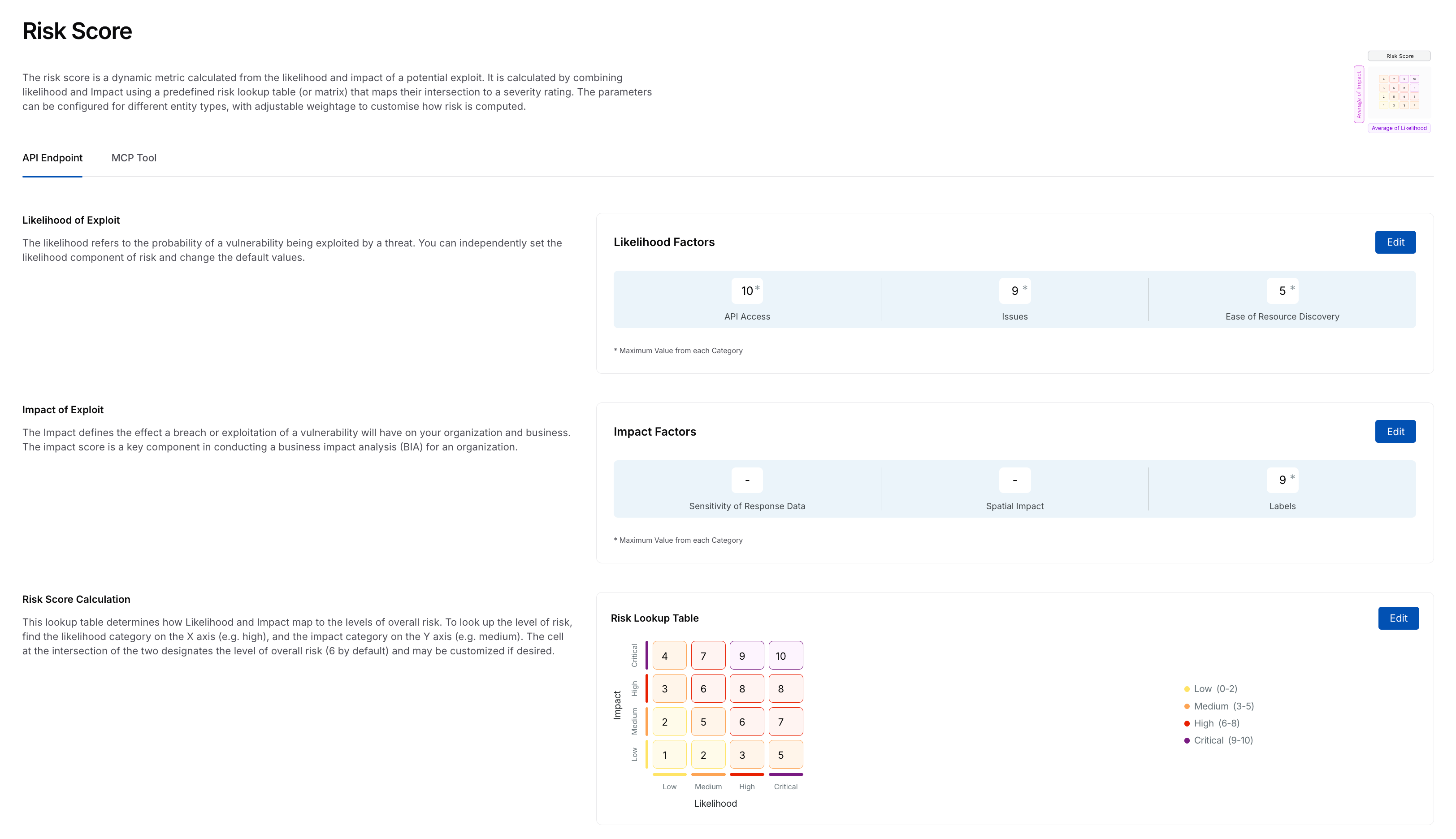
API Risk Score
Traceable provides default values for each component that conform to industry standards; however, you can modify them. This enables you to assess API endpoints and their associated risks against your organizational requirements. The following tabs highlight these components and their contributors:
The likelihood is the probability of a vulnerability being exploited by a threat. You can independently set the likelihood component of risk and change the default values.
Traceable calculates the likelihood score using the following contributors:
API Access — An API is considered more at risk if it is externally accessible, uses weak or no authentication, and is not encrypted. Traceable categorizes the API Access contributor into:
Internal API Access — For APIs accessible within the internal network.
External API Access — For APIs accessible from outside the network.
Within each category, Traceable further classifies authentication as:
Encrypted Authentication — Weak, Strong, or None.
Unencrypted Authentication — Weak, Strong, or None.
APIs that use strong authentication and encryption contribute less to the likelihood score.
Issues — Detected issues (vulnerabilities) associated with an API endpoint contribute directly to the likelihood score. The severities included as part of this score are:
Critical
High
Medium
Low
High and Critical issues increase the likelihood score. Traceable selects the highest applicable severity when calculating this contribution.
Ease of Resource Discovery — Ease of resource discovery refers to how easily an API endpoint can be located and targeted by an attacker. If a resource is easily discoverable, it is more likely to be exploited. Traceable calculates this contributor using path parameter types:
No Path Parameter
Path Parameter (Digit)
Path Parameter (String)
You can enable or disable any of these contributors according to your requirements. Upon disabling, Traceable no longer considers the contributor when calculating risk scores.
Calculating the likelihood score
Each sub-factor has a score ranging from 0 to 10. Traceable assigns the highest sub-factor score as the factor score. The likelihood score is calculated by averaging the highest scores of all enabled factors. For example, consider the following table:
Factor | Sub-factor with the Highest Configured Score | Score |
|---|---|---|
API Access | External, unencrypted, no authentication | 10 |
Issues | Critical | 9 |
Ease of Resource Discovery | Path Parameter (Digit) | 5 |
The total score is the sum of the above scores, which is 24. Further, the likelihood score is 24/3, which is 8.
Note
The average is calculated by dividing by the number of enabled factors. For example, if only two factors are enabled, the denominator changes accordingly.
The impact defines the effect a breach or exploitation of a vulnerability will have on your organization and business. The impact score is a key component in conducting a business impact analysis (BIA) for an organization.
Traceable calculates the impact score using the following contributors:
Sensitivity of Response Data — Sensitive data is any type of information considered confidential or private that should be protected from unauthorized access or disclosure. Traceable categorizes sensitivity into four levels, each with a configurable risk score:
Critical
High
Medium
Low
API endpoints that expose higher-sensitivity data contribute more to the impact score.
Spatial Impact — The spatial impact of an API exploit refers to the extent and scope of the vulnerability's effect on systems, applications, and users that rely on the API. Traceable calculates this contributor based on dependencies:
Dependent APIs
Dependent Third-Party APIs
Labels — Labels enable you to adjust the impact score based on an API endpoint's importance or business context. Traceable adds the Sensitive, Sentry, and Critical labels by default, each with a configurable risk score. You can click Edit Labels to add labels according to your requirements. If multiple labels are applicable to an endpoint, the highest configured value contributes to the impact score. For information on creating labels, see Label Management.
You can enable or disable any of these contributors according to your requirements. Upon disabling, Traceable no longer considers the contributor when allocating risk scores.
After calculating the likelihood and impact scores, Traceable determines the final API endpoint risk score using the Risk Lookup Table. The lookup table maps combinations of likelihood and impact values to a numeric score ranging from 0 to 10. This score determines the severity level assigned to the API endpoint.
Risk Lookup Table
The lookup table maps likelihood (X-axis) and impact (Y-axis) levels to an overall risk score. To look up the level of risk, find the likelihood category on the X axis, for example, High, and the impact category on the Y axis, for example, Medium. The cell at their intersection indicates the overall risk level, for example, 6 by default. You can modify these values to align scoring behavior with your organization's risk model.
Risk Level Guide
Once calculated, the risk score is mapped to a risk level to help you understand the severity:
Risk Level | Score Range | Description |
|---|---|---|
Low | 0-2 | Minimal risk. Standard monitoring and controls are sufficient. |
Medium | 3-5 | Moderate risk. Requires attention and additional security measures. |
High | 6-8 | Significant risk. Immediate review and mitigation required. |
Critical | 9-10 | Severe risk. Urgent action and escalation necessary. |
Update the API endpoint risk score
While Traceable defines risk scores by default, you can customize the API endpoint risk scores to align with your internal policies. You can do this by updating the contributor values and modifying the risk lookup table. Any modifications you make are applied across the Traceable platform for API endpoint risk evaluation.
Note
To update the risk scores, you must have the necessary RBAC permissions (Module Level Access → Discovery → Settings). For more information, see Role-Based Access Control.
To update the risk score for an API endpoint, complete the following steps:
Step 1 — Select the component
Navigate to Discovery → Settings → Risk Score → API Endpoint tab.
Click Edit in either of the following sections:
Likelihood of Exploit
Impact of Exploit
Risk Score Calculation
In the Edit Contributors slide-out panel, you can edit the risk score values corresponding to each contributor. The tabs in the step below highlight these contributors.
Step 2 — Modify the risk score
Traceable categorizes the likelihood factors as follows:
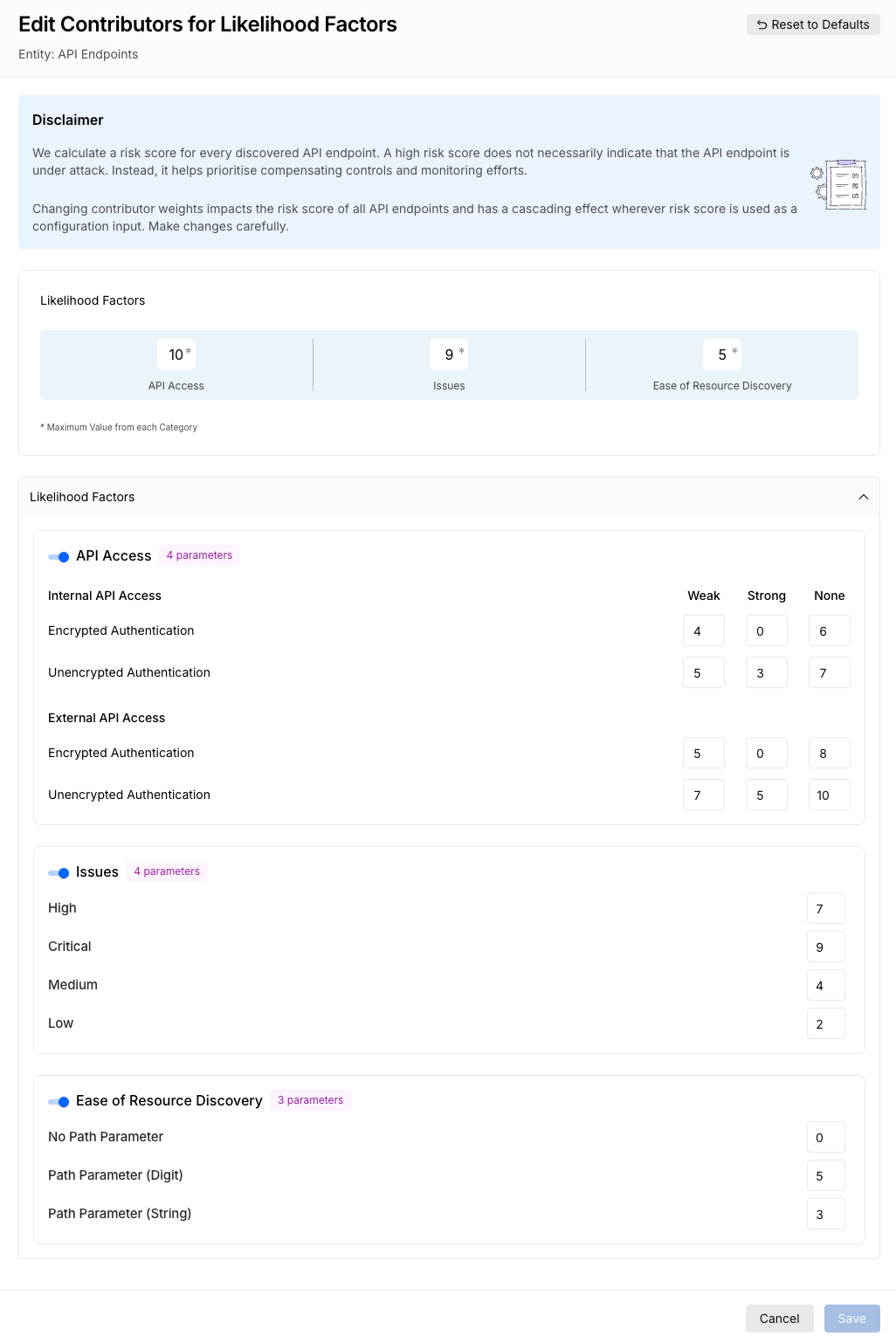
Update Risk Score for Likelihood Factors
API Access — Traceable classifies API endpoints into internal and external, further divided by encryption. For each combination, you can configure the following weights:
Weak — The risk score to assign to endpoints with weak authentication; typically a higher value.
Strong — The risk score to assign to endpoints with strong authentication; typically a lower value.
None — The risk score to assign to endpoints with no authentication; typically the highest value.
Issues — Traceable classifies issues by severity, with each having a configurable risk score:
Critical — The risk score to assign to Critical-severity issues; typically the highest value.
High — The risk score to assign to High-severity issues; typically a higher value.
Medium — The risk score to assign to Medium-severity issues; typically a lower value.
Low — The risk score to assign to Low-severity issues; typically the lowest value.
Ease of Resource Discovery — Traceable classifies endpoints by path parameter type:
No Path Parameter
Path Parameter (Digit)
Path Parameter (String)
Once you have made the necessary changes, click Save.
Traceable categorizes the impact factors as follows:
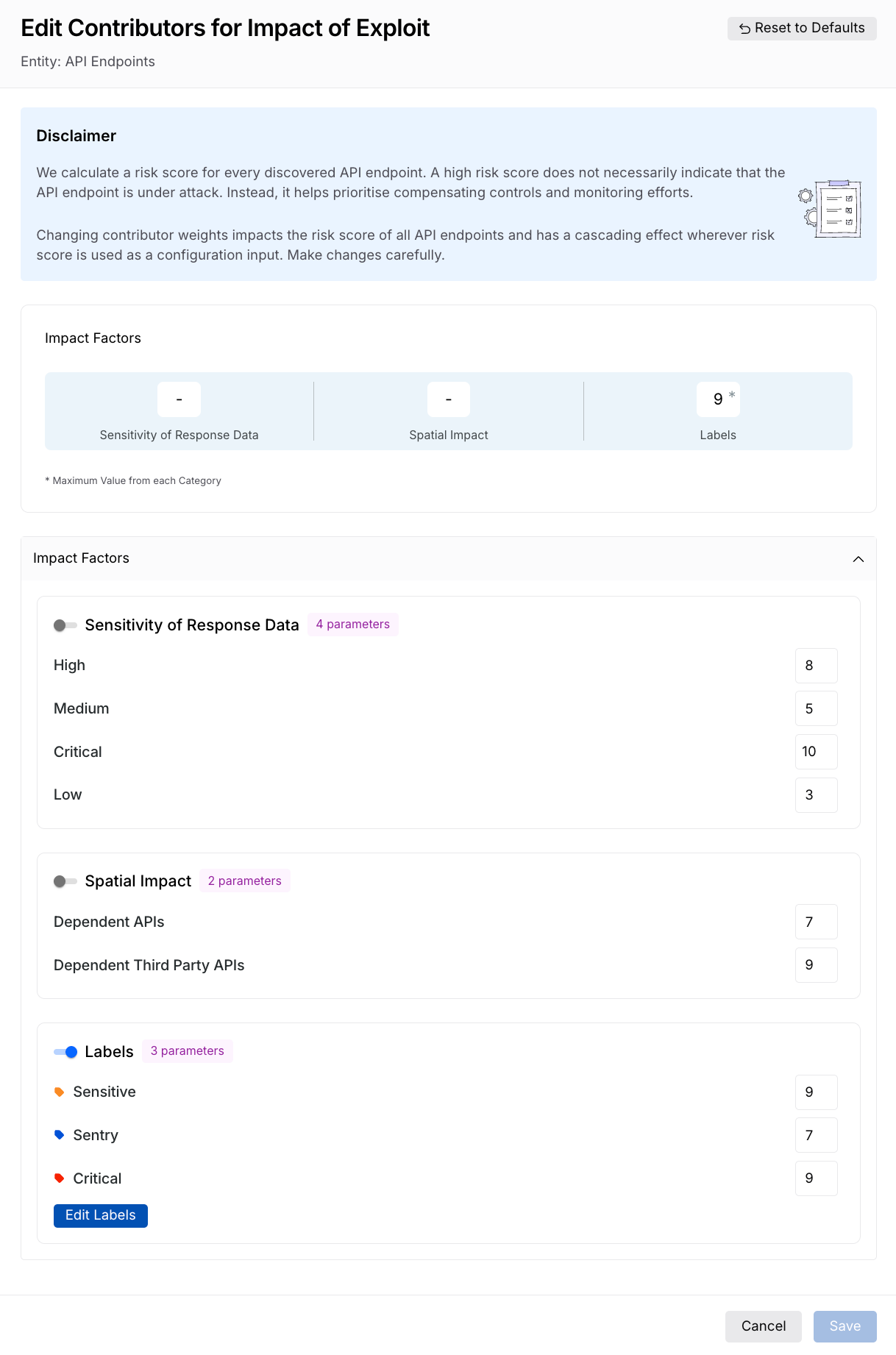
Update Risk Score for Impact of Exploit
Sensitivity of Response Data — Traceable classifies sensitivity into four levels. You can specify the risk score to assign to each:
Critical
High
Medium
Low
Spatial Impact — Traceable calculates spatial impact from API dependencies. You can specify the risk score for:
Dependent APIs
Dependent Third-Party APIs
Labels — Traceable adds the Sensitive, Sentry, and Critical labels by default, each with a configurable risk score. You can click Edit Labels to add more labels and specify a risk score for each.
Once you have made the necessary changes, click Save.
Based on the risk scores you specify in the Likelihood of Exploit and Impact of Exploit sections, Traceable populates the Risk Lookup Table. You can modify the values in the table according to your requirements.
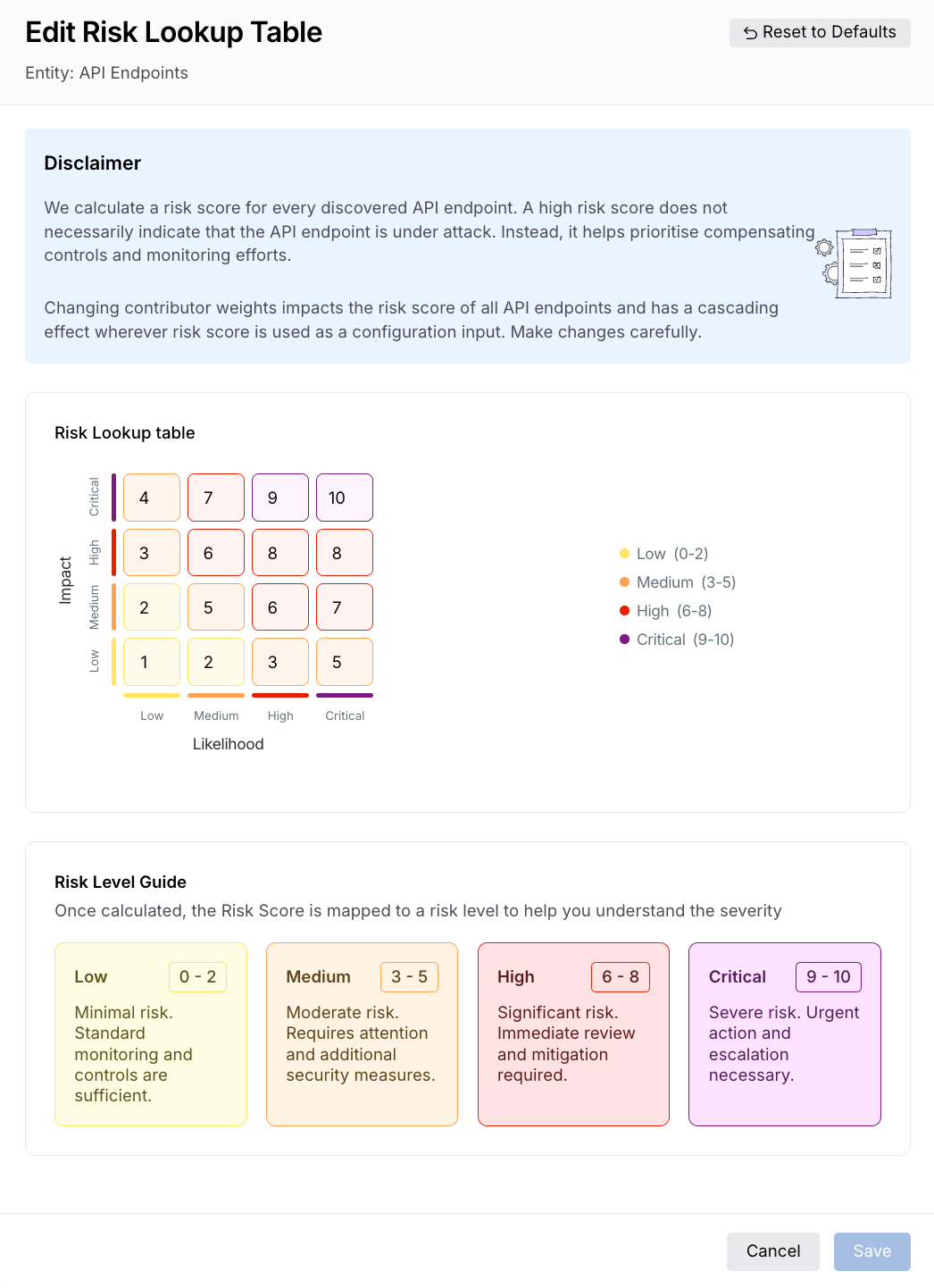
Update Risk Lookup Table
Once you have made the necessary changes, click Save.
Reset risk scores to defaults
Traceable specifies risk scores for each component by default, based on industry standards. While you can modify the risk score using the steps above, you can also restore it to its default values.
To reset the risk score to its default values, complete the following steps:
Navigate to Discovery → Settings → Risk Score → API Endpoint tab.
Click Edit in either of the following sections:
Likelihood of Exploit
Impact of Exploit
Risk Score Calculation
In the top right corner of the slide-out panel, click Reset to Defaults.
In the confirmation dialog, click Confirm.
Traceable resets the scores to the default values.
View the risk score
The risk score is calculated based on the configurations you completed above. The configurations affect the risk score of future traffic. They do not affect an asset's current risk score until the asset receives fresh traffic after the configurations are changed.
Traceable surfaces the risk score in two places, depending on the type of asset you are reviewing.
API endpoints
To view the risk score for an API endpoint, navigate to Discovery → Inventory → API Endpoints tab and select an endpoint. In the Endpoint Details page, locate the Risk Score section. Traceable displays the endpoint's overall risk score, along with the contributors to that score. You can expand each contributor to view detailed information about it. For more information, see Endpoint Details.
AI API assets
To view the risk score for an AI API asset, navigate to Discovery → Inventory → AI Assets tab and select an AI API endpoint. In the asset details page, the Overview tab includes a Risk Score section that provides the API's risk score, its contributors, calculations, and a risk lookup table for detailed analysis. For more information, see AI Asset Details.
Leverage the risk score
The risk score gives you a data-driven way to prioritize security work across your API inventory. Rather than reviewing every API endpoint individually, you can use the risk score to focus your attention on the endpoints that pose the greatest threat to your organization. The following scenarios illustrate how you can use the risk score effectively.
Scenario 1 — Prioritizing remediation for high-risk endpoints
Consider a payment service with an externally accessible endpoint, POST /payments/initiate, that uses no authentication and returns sensitive financial data in its responses. Traceable assigns it a Critical risk score because its likelihood score is high (external access, no authentication) and its impact score is also high (sensitive response data, dependent third-party APIs). You can use this score to flag the endpoint for immediate remediation, such as enforcing authentication and restricting external access, before addressing lower-scored endpoints in the same service.
Scenario 2 — Adjusting contributor weights to reflect organizational priorities
The default contributor weights are based on industry standards, but they may not reflect your organization's specific risk model. For example, if your organization treats any externally accessible endpoint as inherently high-risk regardless of authentication strength, you can increase the weight assigned to External API Access under the API Access contributor. This ensures that the risk scores across your inventory align with how your security team assesses exposure.
Scenario 3 — Using labels to surface business-critical endpoints
If your organization has a set of endpoints critical to business operations that do not carry sensitive data or have known issues, they may receive a deceptively low risk score under the default configuration. You can assign a Critical label to these endpoints and configure a high score for it under the Labels contributor in the Impact of Exploit section. This raises the impact score for those endpoints, ensuring they receive the scrutiny they deserve during security reviews.