Schema Validation ensures that incoming API requests adhere to the expected API schema. The schema may originate from the specification that you upload or from the schema that Traceable automatically learns from traffic. Each Schema Validation rule lets you choose which schema should be used for evaluation. Traceable follows this configuration consistently when generating detection events.
This topic explains how uploaded specifications are processed, linked to API entities, and participate in Schema Validation. It also describes how Traceable selects between primary and secondary schemas, and what to expect when specifications do not fully describe an API.
What will you learn in this topic?
By the end of this topic, you will be able to understand:
How uploaded API specifications are processed, linked to your API inventory, and used in Schema Validation.
How Schema Validation selects between user-defined schemas and learned schemas, and how fallback works for undefined APIs.
How to configure rules and schema settings to enforce API security.
How Schema Validation handles incomplete or partially described specifications.
Limits, environment-specific behavior, and uploading specifications to specific environments.
Supported specification types
For HTTP APIs, OpenAPI specifications are fully supported.
Understand schema validation
Schema validation is a set of rules in API Protection that checks whether a request conforms to the expected structure of an API. These rules evaluate details such as required parameters, unknown parameters, request body structure, and content type. Each rule relies on an API schema.
By default, Schema Validation threat rules use User-Uploaded Schema as the Primary API Schema. The Fallback API Schema is not configured unless you explicitly set it. When a request is evaluated, Traceable uses the Primary API Schema for evaluation, if available. If the Primary API Schema is not available and a Fallback API Schema is configured, Traceable uses the Fallback API Schema instead. If neither contains the API, Schema Validation does not evaluate that request. This approach maintains consistent and predictable detection behavior across your APIs.
Upload API specifications
You can upload your API documentation from the Discovery page under API Documentation. For HTTP APIs, Traceable supports OpenAPI files in YAML or JSON format. For more information on uploading API specifications, see API Documentation and Inspector.
After a file is uploaded, Traceable begins a resolution process. During resolution, the system reads the specification's structure, identifies the APIs defined within it, and maps each API to its corresponding API entity. Once this completes, the uploaded documentation becomes available for Schema Validation.
Note
Resolution usually finishes within a few minutes, although it may take longer in some situations. No action is required during this time.
How specifications link to API entities
After resolution, you can open any API in the Inventory and view its linked documentation. If multiple uploaded specifications describe the same API, Traceable uses the most recently modified specification for Schema Validation.
This linkage determines whether a user-defined schema is considered available for an API and directly influences how Schema Validation selects between schemas.
Configuring the API schema type for validation
When configuring Schema Validation rules, you choose a primary schema and may specify a secondary schema.
The user-defined schema is derived from the uploaded OpenAPI specification.
The learned schema is created automatically from observed traffic.
The schema you select as primary takes precedence. Traceable uses it if it is available for the API being evaluated. If this is not the case, a secondary schema is used instead. If neither contains the API, validation is skipped for that request. This selection logic helps ensure that Schema Validation behaves as you intend.
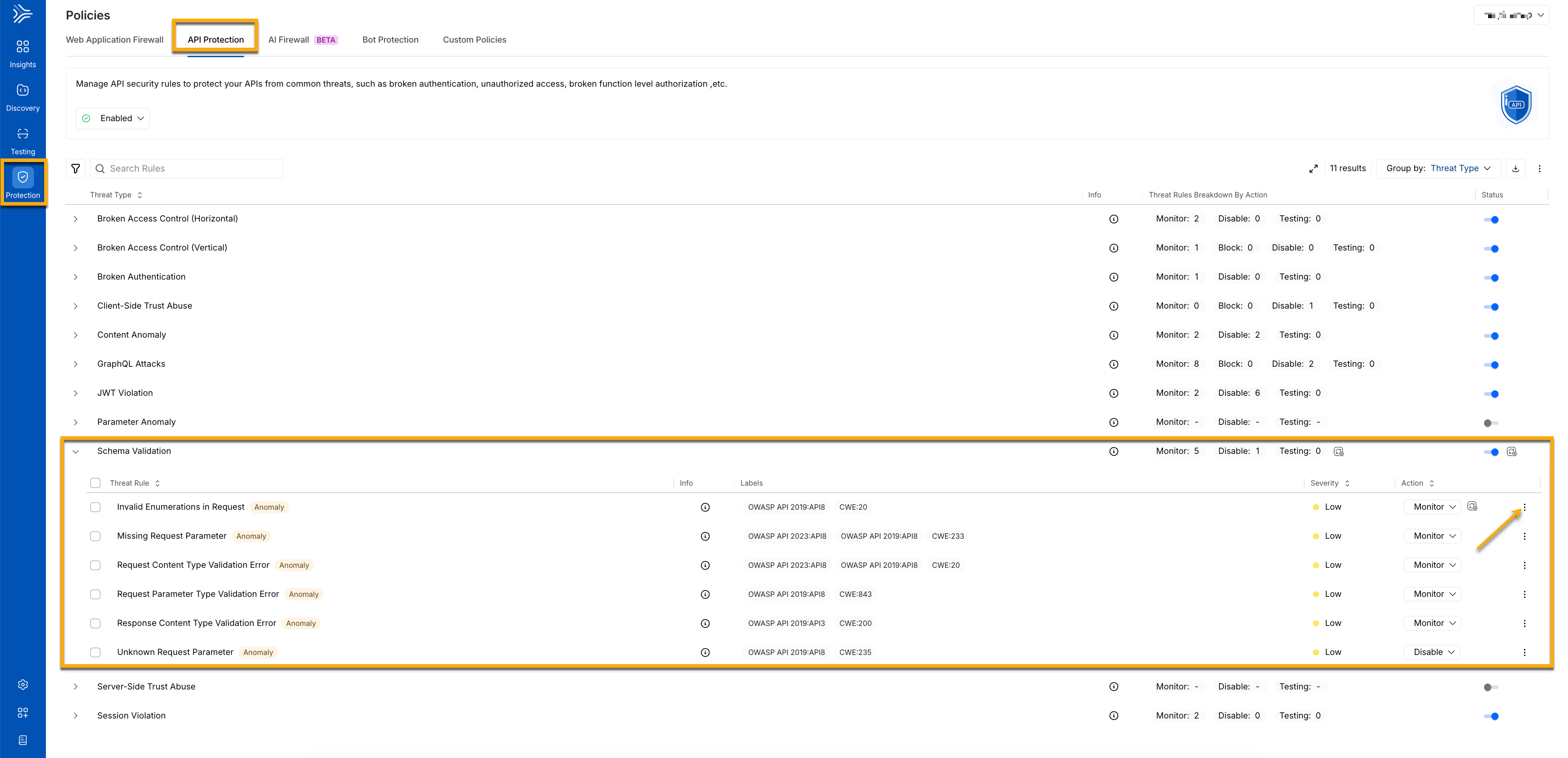
Understanding which schema was used
When Schema Validation generates an event from a user-defined schema, the event description includes the documentation ID. Events without this ID are based on the learned schema.
This distinction is useful when verifying configuration changes or testing how a new specification behaves.
Working with incomplete specifications
A specification may still be valid even when specific fields, parameters, or request bodies are not fully defined. Schema Validation uses the uploaded structure as the source of truth. If the documentation is incomplete, you may see events that reflect those missing details. Reviewing the completeness of the specification often helps clarify these outcomes.
Limits and environmental behavior
Schema Validation configuration is environment-specific. The upload workflow in the UI does not currently allow you to select an environment. If you need to upload a specification to a specific environment, you can use the REST upload endpoint and include the environment details in the request payload. Use this API when your workflow requires uploading documentation to a specific environment. For more information on limits and the size of specifications, see Specification uploads limits.
Example — Uploading a specification to a specific environment
Before you run the example
When using the REST upload endpoint:
Replace
<token>with your user token.Update the environment name inside
environmentConfig.valuesin the JSON payload.Update the
file_0path to point to your local specification file.
This is all you need to modify. The remaining fields are handled automatically by Traceable.
Sample Code
curl --location 'https://app.traceable.ai/rest/upload' \
--header 'accept: application/json, text/plain, */*' \
--header 'Authorization: Bearer <token>' \
--form 'uploadConfiguration="{
  \"uploadOperation\": [{
    \"apiDocumentUploadOperation\": {
      \"name\": \"new_schema_validation.json\",\n      \"specPath\": \"/new_schema_validation.json\",\n      \"specType\": \"SPEC_TYPE_OPEN_API_SPEC\",\n      \"configKey\": \"file_0\",\n      \"apiNamingEnabled\": true,\n      \"apiDiscoveryEnabledV2\": true,\n      \"postUploadOperations\": [{
        \"apiDiscoveryData\": {
          \"apiDiscoveryEnabled\": true,\n          \"openApiSpec\": {},\n          \"apiAttribute\": {
            \"environmentConfig\": {
              \"values\": { \"values\": [ \"your_env\" ] }
            }
          },\n          \"apiDiscoveryScope\": { \"discoverAll\": {} }
        }
      }]
    }
  }]
}"' \
--form 'file_0=@"/path/to/your/spec.json"'