GitHub Actions is an automation and workflow tool that GitHub provides. It allows developers to automate tasks and define workflows using YAML files. Workflows are triggered by events such as code pushes or pull requests and can include a series of actions. Actions are reusable tasks that can be combined to create workflows. GitHub Actions is commonly used for continuous integration/continuous deployment (CI/CD) pipelines.
Traceable integrates with GitHub Actions by running security scans in staging environments. Traceable helps you by finding vulnerabilities in the early stages of SDLC, giving developers and product security engineers more time and context to prioritize the mitigation of vulnerabilities and build secure APIs. The topic explains how to configure and use Traceable xAST CI/CD integration and how to run the scan during the build step.
Note
The following GitHub Actions page will be deprecated. For the latest GitHub Actions and documentation, see GitHub Actions.
What you will learn from this topic
By the end of this topic, you will be able to understand:
Where the Traceable AST action is published, and the file that defines it.
The inputs available on the GitHub Action.
Before you begin
Make a note of the following before integrating GitHub Actions with Traceable:
Make sure that you have an active account and repository on GitHub.
It is helpful if you have a basic understanding of GitHub Actions and workflows. For information, see GitHub Actions documentation.
Integration
Integrating Traceable xAST with GitHub workflows using GitHub Actions entails finding a GitHub Action, understanding its inputs and outputs, and creating a sample workflow. All the GitHub Actions by Traceable are currently available in the GitHub repository.
Understand the inputs
The following table explains the various inputs.
Input | Description |
|---|---|
| Scan action: init/ run/ init and run/stop. |
| The name of the scan. |
| Access the token from the Traceable Platform. You can fetch the access token by navigating to Your Account ( |
| The Traceable CLI version to be used. For more information, see Traceable CLI. |
| The environment for which AST should observe the traffic. |
| List of plugins you wish to run the AST scan for. |
| Include the URL patterns to test. |
| Exclude URL patterns from the scan. |
| Target URL for the tests. |
| URL for the Traceable server. This does not apply to SaaS users. |
| Timeout for a scan when it goes in the IDLE state. |
| Reference environment from where AST should pick up the API specifications. |
| Max retries for the scan after a failure. |
| The AST suite name as defined on the Traceable platform. |
| A comma-separated list of GraphQL schema IDs uploaded to the Traceable platform. |
| A comma-separated list of GraphQL SDL file paths. |
| Enables extracting the GraphQL schema by running introspection on the target URL. |
 ) → My Preferences → API Tokens. For more information, see
 Sample GitHub Actions workflow
The following is a sample workflow showing how to configure the AST GitHub Action:
name: Test Traceable AST Init And Run Action With AST Scan Suite
on:
  push:
    branches:
      - main
  pull_request:
  workflow_dispatch:

jobs:
  InitAndRunAstScan:
    runs-on: ubuntu-20.04
    steps:
      - name: Checkout
        uses: actions/checkout@v3
      - name: Init and run scan action
        uses: Traceableai/ast-action@main
        with:
          step_name: 'init and run'
          client_scan_token: ${{ secrets.CLIENT_SCAN_TOKEN_DEMO }}
          cli_version: 'latest'
          scan_suite: 'github-actions-test-suite'
          traceable_server: ${{ secrets.TRACEABLE_SERVER_DEMO }}
      - name: Stop Scan
        if: always()
        uses: Traceableai/ast-action@main
        with:
          step_name: 'stop'
          client_scan_token: ${{ secrets.CLIENT_SCAN_TOKEN_DEMO }}
          traceable_server: ${{ secrets.TRACEABLE_SERVER_DEMO }}
  functionalTest:
    runs-on: ubuntu-20.04
    steps:
      - name: Run a loop as functional test (This is sample)
        run: |
          for ((i=1;i<=100;i++));
          do
             echo $i
          done
The workflow performs the following actions:
The Init and run scan action step initiates a scan using
client_scan_token,scan_suite, andtraceable_serveras inputs. You can add any of the other parameters from the inputs table above. Alternatively, you can configure assets, attacks, and evaluation criteria as a scan suite on the Traceable platform, and then reference only its name through thescan_suiteparameter.The Stop Scan step ends the scan. It is marked
if: always(), so the scan is stopped even when an earlier step in the job fails.The
functionalTestjob generates the API traffic that the scan tests against. In the sample above, it is a placeholder loop, which you replace with your own functional test suite.
Triggers
GitHub workflow supports a wide range of triggers. For more information, see Events that trigger workflows.
View reports
The following is a sample AST report once the scan is executed. The report shows various details about vulnerability categories, subcategories, and severity.
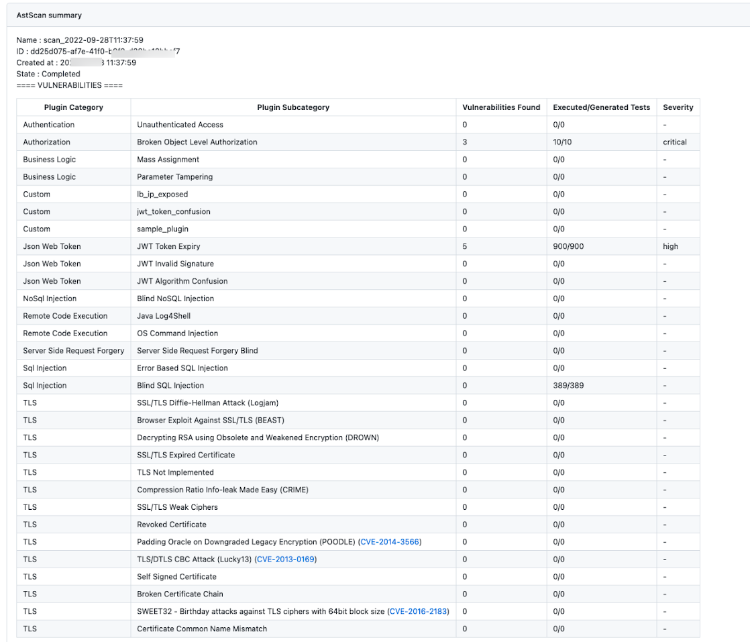
Sample report
You can view the report under the Actions tab in your GitHub repository:
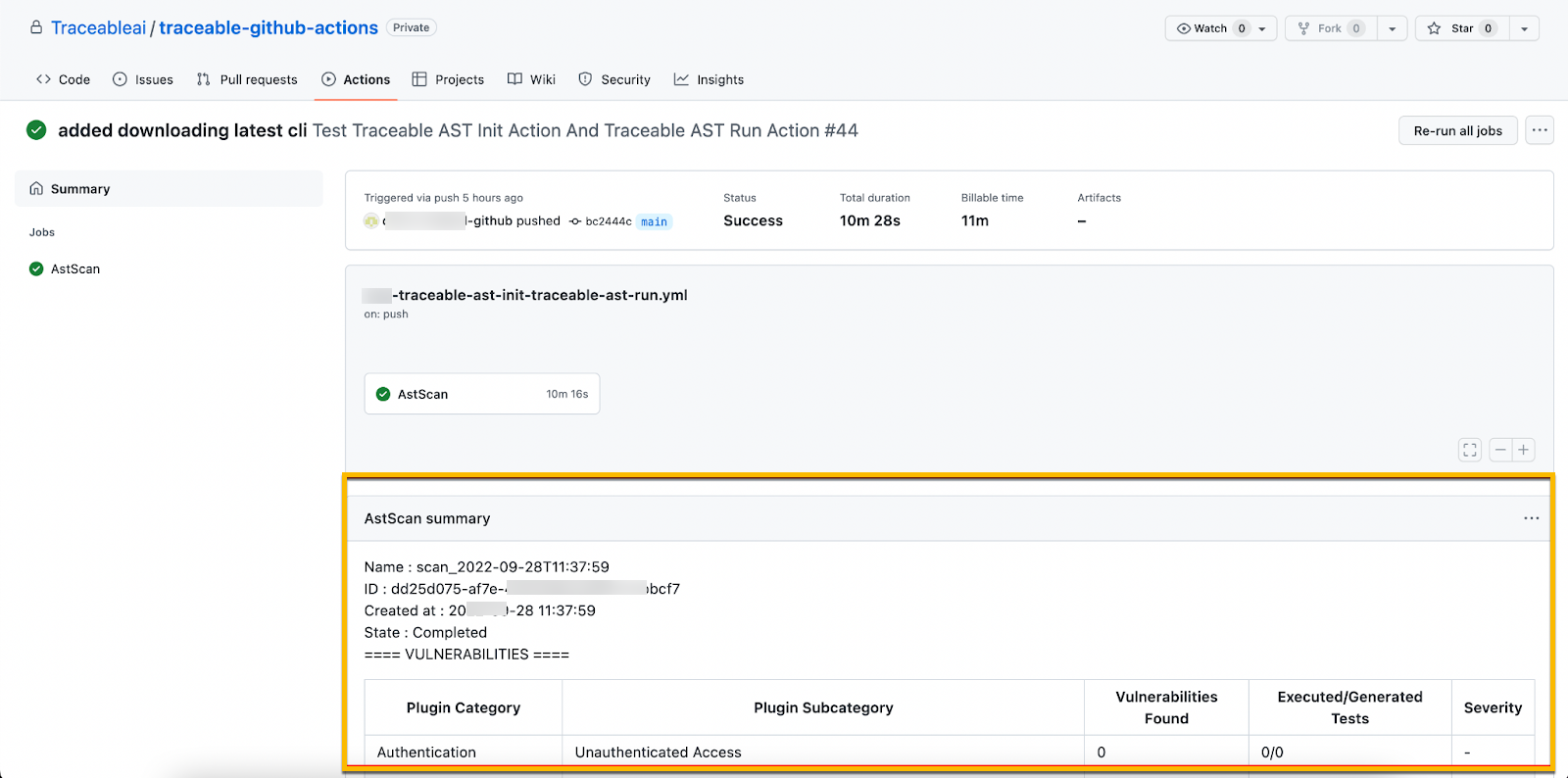
View scan report in GitHub repository