Updates (April 2026 to June 2026)
June 2026 — Updated the topic to add information about the added configurations for the Broken Access Control (Horizontal) threat type in API protection policies. For more information, see Understand API protection threat rule configurations.
API Protection policies in Traceable help secure APIs by detecting and responding to threats based on real traffic behavior. Instead of relying only on static rules, these policies provide flexible, rule-based controls that adapt to how APIs are actually used. With built-in threat types and configurable detection rules, you can monitor suspicious activity, fine-tune enforcement, and take action without disrupting legitimate requests. This helps maintain strong security coverage while ensuring APIs remain reliable and performant. The policy includes predefined threat types and rule-level configurations that allow you to control how threats are detected and handled across different environments.
What will you learn in this topic?
By the end of this topic, you will be able to understand:
How API Protection policies help secure your APIs from common threats.
Different API threat types and their impact on your application.
How threat rules detect and respond to suspicious activity.
How to configure and manage policy settings.
How to customize rule configurations based on your API traffic patterns.
How policy overrides work across different environments.
Key features and navigation
The API Protection Policy enables you to monitor and disable threats targeting predefined threat types that affect your APIs. This policy helps you protect your application ecosystem from API attacks, such as JWT Anomalies, Session Violations, and Account Takeovers. To view or configure the policies, you can navigate to Protection → Policies → API Protection, and select the policy you want to configure.
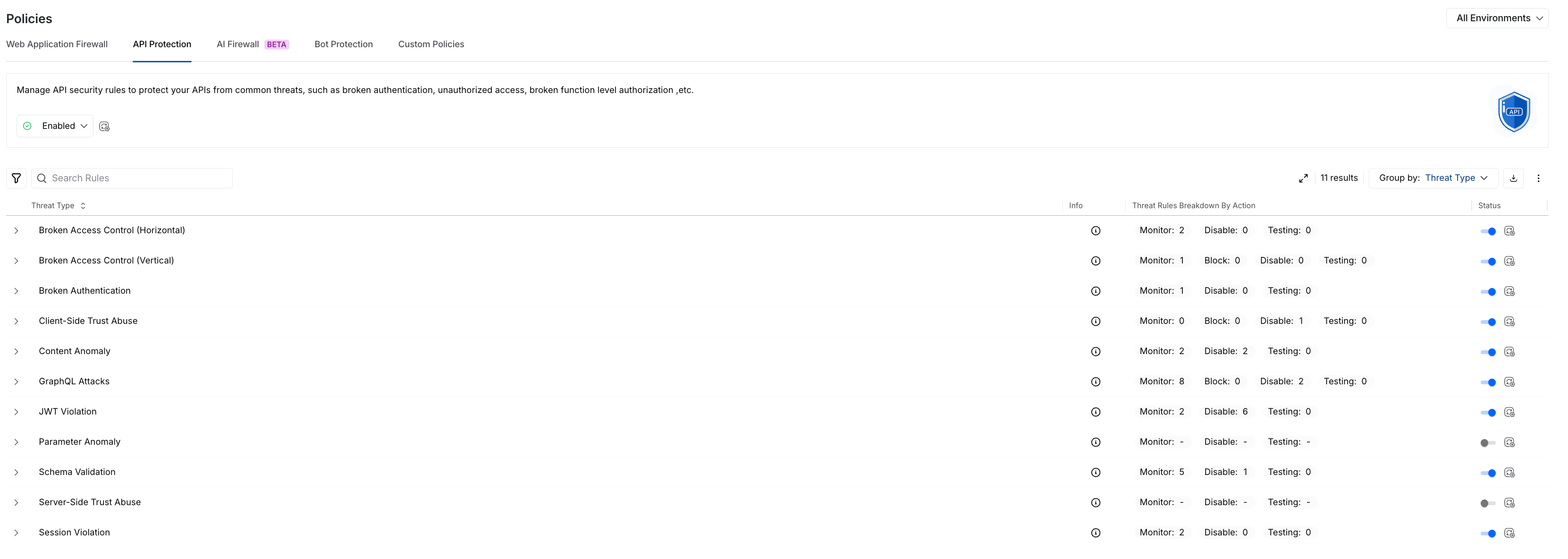
API Protection Policy
Key features
The following are the features of the API protection policy tab:
Features | Description |
|---|---|
Threat Type/Threat Rule List | It shows predefined API Protection rules, categorized by Threat Types, by default, for example, Session Violation. |
Rule Information | Shows the following details for each rule:
|
Severity Levels | Shows the severity assigned to a rule, indicating the impact of the threat it detects. |
Actions | It indicates the action that Traceable should take in response to the threat detected by the rule. You can configure the following actions for a rule:
While you can configure the above action for each threat rule, each Threat Type row shows the count of threat rules categorized by the configured action. |
Status | Shows the current status of a Threat Type, Enabled or Disabled.
|
Filtering and Grouping | You can filter and/or group rules using the Filter ( |
.png) ) icon to view the Description, Impact, Mitigation, and References of a Threat Rule/Type.
) icon to view the Description, Impact, Mitigation, and References of a Threat Rule/Type. ) icon and Group By drop-down.
Policy management
Policy management in Traceable follows a hierarchical structure, turning policies on or off at both environment-level and granular levels. You can manage the components within the API Protection policy tab at the following levels:
(1).png)
API Protection Policy Management
Environment Level — You can select the environment from the page’s top right corner and enable or disable the policy from the Status drop-down at the top of the tab. This enables or disables all threat types in the selected environment.
Note
Aggressive rules are disabled by default.
Threat Type Level — You can use the Toggle next to the Threat Type to enable or disable the threat rules under it. This enables or disables all the threat rules under it.
Threat Rule Level — You can use the Action drop-down next to a Threat Rule to enable (Monitor or Block) or disable (Disable) it.
While enabling the API protection policy at the environment level enables all threat types, you can also enable or disable the individual threat types or rules as required. Similarly, when you enable a threat type, you can manage the rules independently.
Overrides in threat type or rule actions
Modifying the action (enable or disable) for a threat type/rule in a specific environment overrides the default action set at the Environment Level. If you switch back to viewing actions across All Environments, Traceable shows an Override (.png) ) icon corresponding to the modified threat, which, when hovered over, shows the environments where the action has been customized. For example, if you set a Threat Rule to Block at the All Environments level, then navigate to the Sandbox environment and change the action for that rule to Monitor when you switch to All Environments from the Environment drop-down. Traceable shows that the global action has been overridden in the Sandbox environment through the override icon.
) icon corresponding to the modified threat, which, when hovered over, shows the environments where the action has been customized. For example, if you set a Threat Rule to Block at the All Environments level, then navigate to the Sandbox environment and change the action for that rule to Monitor when you switch to All Environments from the Environment drop-down. Traceable shows that the global action has been overridden in the Sandbox environment through the override icon.
Traceable, via the Override icon, ensures visibility into environment-specific configurations, allowing you to track and manage threat types or rules effectively.
Understand API protection threat types
You can use API Protection in Traceable to identify common API threats based on how your APIs behave. Each threat type represents a specific risk category, helping you understand the type of activity being detected. This gives you a clear view of potential vulnerabilities so you can take the right actions to secure your APIs.
API Protection Rule Configurations
The following table lists and describes the various threat types and their descriptions that Traceable detects for API Protection:
Threat Type | Threat Type Description |
|---|---|
Broken Access Control (Horizontal) | Horizontal Broken Access Control occurs when a user attempts to access resources or data belonging to another user with the same level of privilege. This typically results from insecure direct object references or insufficient authorization checks. |
Broken Access Control (Vertical) | Vertical Broken Access Control occurs when a user attempts to access functionality or resources that require higher privileges than their assigned role. |
Broken Authentication | Broken Authentication occurs when authentication mechanisms are bypassed, compromised, or missing, allowing unauthorized access to an application. |
Client-Side Trust Abuse | Client-side trust abuse occurs when an application improperly trusts client-provided data or requests without adequate validation. This can allow attackers to perform unauthorized actions or manipulate application behavior. |
Content Anomaly | A Content Anomaly is detected when the content type or payload size of a request or response deviates from expected behavior. This includes unexpected Content-Type headers or unusually large payloads for a given endpoint. |
GraphQL Attacks | GraphQL Attacks occur when requests violate GraphQL schema rules, such as using unknown fields, using incorrect data types, or failing to meet required constraints. |
JWT Violation | JWT Violation occurs when a JSON Web Token contains missing or incorrectly configured claims. Such misconfigurations can cause the token to behave differently than intended, leading to authorization issues. |
Parameter Anomaly | Parameter Anomaly is detected when input parameters deviate from expected structure, encoding, type, or value ranges. Such anomalies may indicate probing activity, misconfigured clients, or injection attempts. |
Schema Validation | Schema Validation anomalies occur when requests or responses do not conform to the defined schema, such as missing required fields, unknown parameters, incorrect data types, or invalid enum values. These deviations may indicate probing activity, misconfigured clients, or attempts to bypass security controls and are common in both REST and GraphQL APIs. For more information, see Schema Validation. |
Server-Side Trust Abuse | Server-side trust abuse occurs when attackers exploit the server’s ability to access internal or external systems on their behalf. This can allow bypassing network controls and may lead to internal reconnaissance, credential exposure, data exfiltration, or further compromise of internal services. |
Session Violation | A Session Violation occurs when session management mechanisms are compromised, allowing attackers to misuse or hijack user sessions. |
Understand API protection threat rule configurations
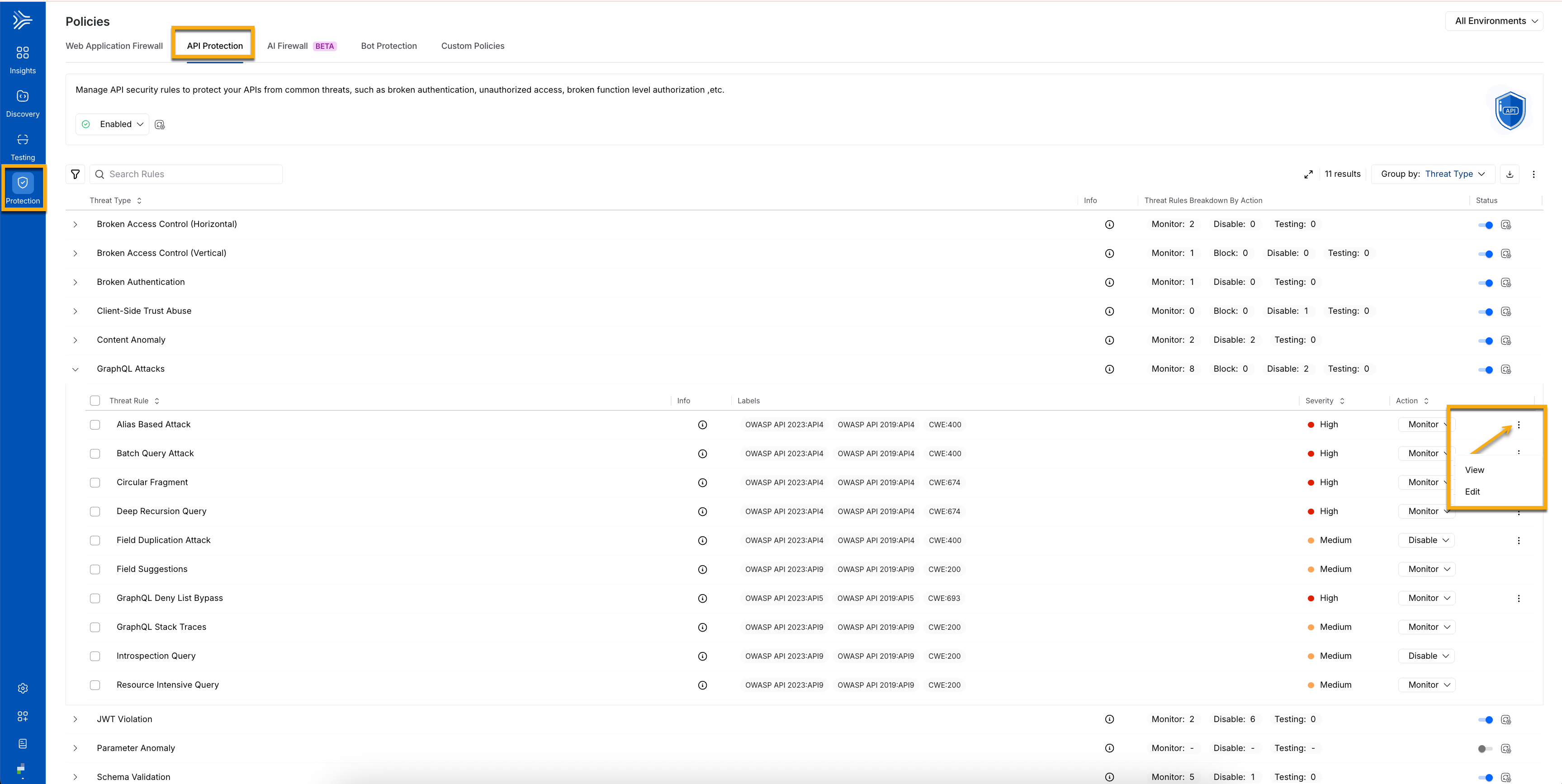
Each threat type in Traceable includes one or more detection rules with configurable settings. These configurations let you control how threats are identified and how strictly protections are applied. By tuning these settings, you can align detection with your API traffic patterns and maintain strong security coverage. From the list of available policies, select the relevant policy type, then click the ellipsis icon (.png) ) next to the policy to view, edit, or update its configuration according to your requirements.
) next to the policy to view, edit, or update its configuration according to your requirements.
API Protection Rule Configurations
The following table lists and describes the various threat types that Traceable detects for API Protection and rule configurations on a threat rule basis:
Threat Type | Threat Rule | Threat Rule Configuration |
|---|---|---|
Broken Access Control (Horizontal) | Authorization Bypass - Object Level (Object BOLA) |
|
Broken Authentication | Potential Unauthenticated Access | Authorization Token Validation Patterns — It identifies authentication fields such as tokens and sessions, so you can enforce authentication consistently and block unauthorized access. |
Client-Side Trust Abuse | Cross-Site Request Forgery (CSRF) | HTTP Methods Configuration — It defines which API request methods require validation, helping you control where enforcement is applied. CSRF Token Validation Patterns Configuration — It specifies patterns to validate CSRF tokens, ensuring requests are authentic and preventing unauthorized or unintended actions. |
Content Anomaly | Request Content Explosion | Max Baseline Multiplier Threshold — It sets limits on payload growth, so you can detect unusually large or deeply nested requests and prevent resource exhaustion. |
Unexpected Request Content Length | Max Baseline Multiplier Threshold — It flags abnormal increases in request size, allowing you to identify tampered or malformed inputs early. | |
Unexpected Response Content Length | Max Baseline Multiplier Threshold — It highlights irregular response sizes, helping you detect potential data exposure or backend issues. | |
GraphQL Attacks | Alias-Based Attack | Max Aliases — It caps alias usage per query, so you can reduce query obfuscation and control excessive processing. |
Batch Query Attack | Max Batches — It limits the number of operations per request to prevent backend overload. | |
Deep Recursion Query | Max Depth — It limits query nesting levels, helping you avoid deeply recursive queries that degrade performance. | |
Field Duplication Attack | Max Duplicates — It limits the number of repeated fields, reducing unnecessary processing and large responses. | |
GraphQL Deny List Bypass | Field Deny List — It blocks access to restricted fields so that you can protect sensitive data and operations. | |
JWT Violation | JWT Algorithm Confusion | Allowed Algorithms — It restricts accepted signing methods, so you can enforce token integrity and prevent signature bypass. |
Parameter Anomaly | Integer Anomaly (Value Out of Range) | Max Length Difference — It defines acceptable numeric variation so that you can detect abnormal inputs and potential probing attempts. |
Schema Validation | Invalid Enumerations in Request | The Primary API Schema — It enforces allowed values, preventing invalid inputs from reaching backend services. |
Missing Request Parameter | The Primary API Schema — It ensures that required fields are present so that you can block incomplete requests. | |
Request Content Type Validation Error | The Primary API Schema — It validates request formats, ensuring consistent API behavior. | |
Request Parameter Type Validation Error | The Primary API Schema — It enforces correct data types, helping you prevent malformed or malicious inputs. | |
Response Content Type Validation Error | The Primary API Schema — It validates response formats, ensuring consistency across API responses. | |
Unknown Request Parameter | Primary API Schema Configuration — It defines the expected API structure, including fields, data types, and formats, so you can detect unexpected or invalid data. Parameter Regexes to Ignore Configuration — It specifies regex patterns for parameters to exclude from validation, enabling dynamic fields without unnecessary alerts. | |
Server-Side Trust Abuse (SSRF) | SSRF: Unknown Protocol | Allowed Protocols — It restricts outbound communication paths, helping prevent unsafe or unexpected protocol usage. |
SSRF: Unknown Host | Host Validation Controls — It ensures requests target trusted destinations so that you can control outbound access. | |
SSRF: Malicious Host | Host Validation Controls — It blocks untrusted or malicious hosts, helping reduce SSRF risk. | |
Session Violation | Land Speed Violation | User Location and IP Behavior Controls — It evaluates access patterns across locations and IPs to detect abnormal activity and potential session misuse. |