Updates (January 2026 to March 2026)
Updated the Threat types and their description.
Web Application Firewall (WAF) Policy enables you to monitor and block threats for a pre-defined set of threat types. This policy helps your security teams protect your application ecosystem from web app and API attacks such as cross-site scripting (XSS), SQL injection, and PHP attacks.
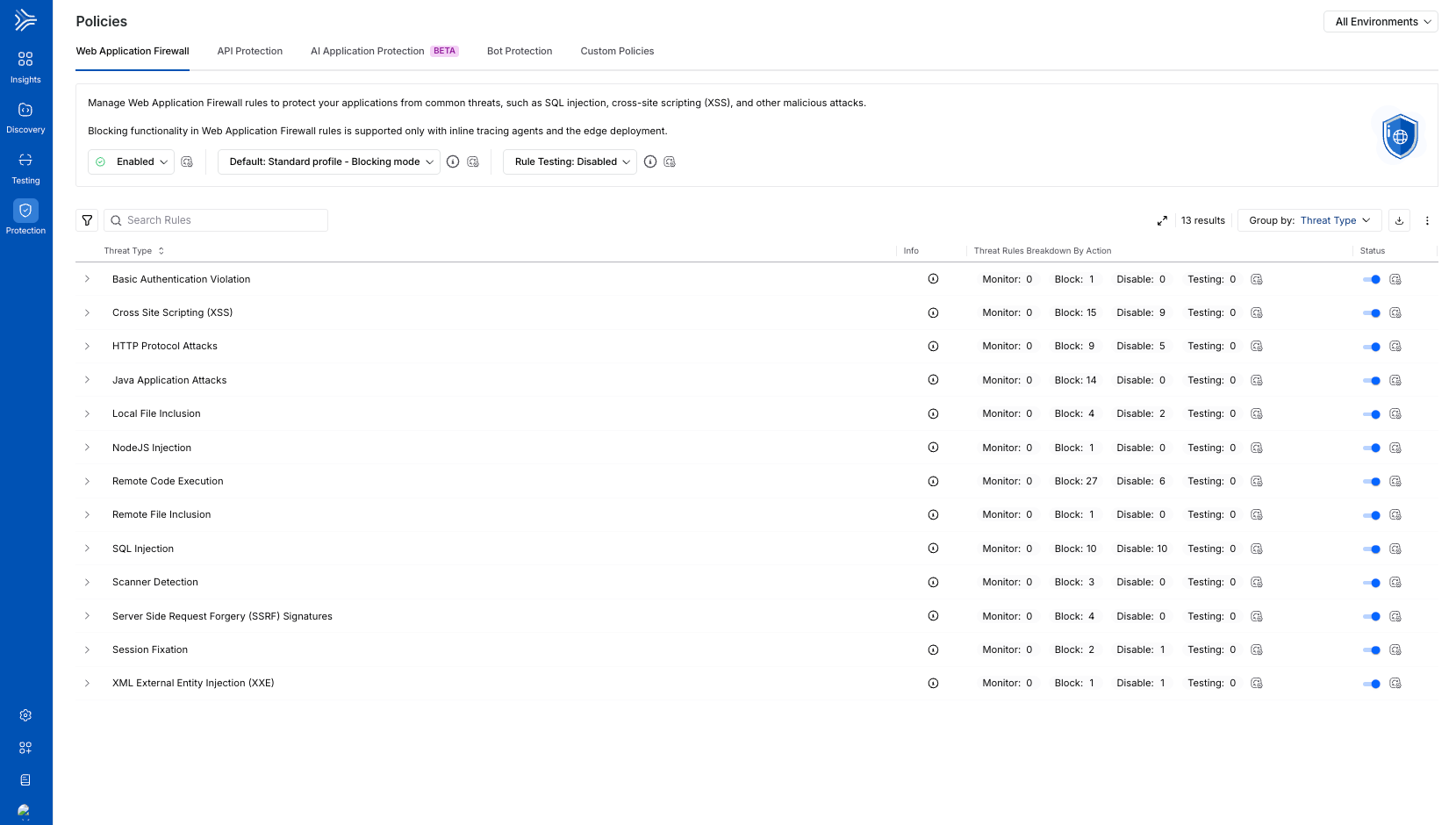
WAF Policies
What will you learn in this topic?
By the end of this topic, you will understand:
The key features of the WAF Policy tab.
The levels at which you can manage policies.
The way to reset all modifications to the default setting.
The rule testing for new and/or updated rules.
Key Features
The following are the features of the Web Application Firewall Policy tab:
Features | Description |
|---|---|
Policy Enablement Status | It shows whether the WAF policies are enabled or not. Upon enabling, Traceable protects your application from the threat types visible in the tab. For more information, see Policy Management. |
Profile | It shows the standard profile across environments, such as monitoring or blocking mode. For more information, see Profiles and Overrides in WAP Policies. |
Rule Testing | It shows a set of choices that you can enable to test the newly updated rule(s) behavior. For more information, see Rule Testing for New or Updated Rule(s). Traceable also maintains a changelog with the list of new and updated rules. For more information, see WAP Policies Changelog. |
Threat Type/Threat Rule List | It shows pre-defined WAF rules categorized by Threat Types by default, such as Local File Inclusion. |
Aggressive Rules | The highly sensitive rules that protect your application against multiple attacks but may cause false positives. Such rules usually require fine-tuning through exclusion rules. Traceable shows the Aggressive label corresponding to such Threat Rules. |
Rule Information | Shows the following details for each rule:
|
Severity Levels | Shows the severity assigned to a rule, indicating the impact of the threat it detects. |
Actions | It shows the action that Traceable should take regarding the threat detected by the rule. You can configure the following actions for a rule:
While you can configure the above action for each threat rule, each Threat Type row shows the count of threat rules categorized by the configured action. For more information, see Policy Management. |
Threat Enablement Status | Shows the current status of a Threat Type, Enabled or Disabled.
|
Filtering and Grouping | You can filter and/or group rules using the Filter ( |
.png) ) icon to view the Description, Impact, Mitigation, and References of a Threat Rule/Type.
) icon to view the Description, Impact, Mitigation, and References of a Threat Rule/Type. ) icon and Group By drop-down.
Policy Management
Policy management follows a hierarchical structure in Traceable, enabling or disabling policies at an environment or granular level. You can manage the components within the WAF policy tab at the following levels:
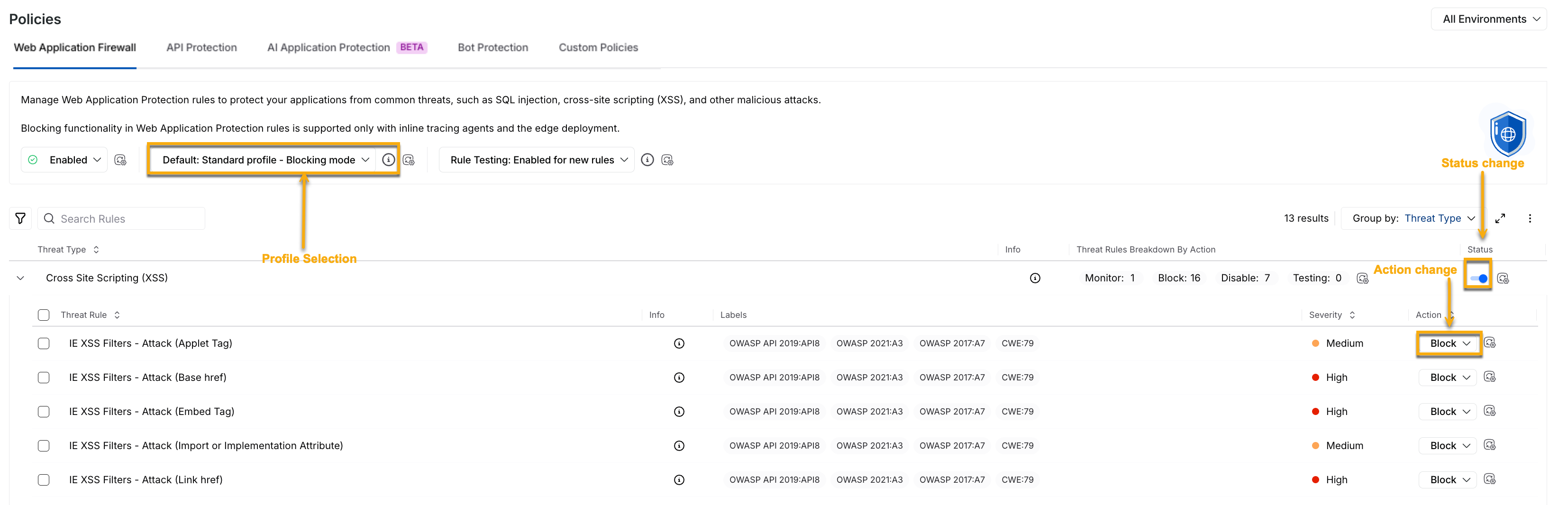
WAF Policy Management
Environment Level — You can select the environment from the page’s top right corner and enable or disable the policy from the Status drop-down at the top of the tab. This enables or disables all the threat types collectively on the selected environment. Additionally, you can update the profile you wish to apply across environments.
Note
Aggressive rules are disabled by default.
Threat Type Level — You can use the Toggle next to the Threat Type to enable or disable the threat rules under it. This enables or disables all the threat rules under it.
Threat Rule Level — You can use the Action drop-down next to a Threat Rule to enable (Monitor or Block) or disable (Disable) it.
Enabling the WAP policy or selecting a profile at the environment level enables all threat types and applies the pre-defined configurations, respectively. However, you can also enable or disable the individual threat types/rules and update profiles according to your requirements. Similarly, when you enable a threat type, you can manage the rules independently.
Note
Any change at either of the above levels in All or specific environments is called an override. For more information, see Profiles and Overrides in WAP Policies.
Reset to Default
You can also reset all configurations to the default setting by clicking the Ellipse ( ) icon corresponding to the Group by drop-down and clicking Reset to default. Upon resetting, Traceable updates the status of policies based on the standard profile you selected above.
Understanding Web Application Firewall threat types
The following table lists and describes the various threat types that Traceable detects for Web Application Firewall:
Threat type | Description |
|---|---|
Basic Authentication Violation | Basic Authentication Violation occurs when attackers exploit weaknesses in HTTP Basic Authentication. This typically involves insecure transmission of credentials, weak or easily guessed passwords, or the absence of proper encryption. |
Cross-Site Scripting (XSS) | Cross-Site Scripting (XSS) occurs when a web application uses untrusted input without proper sanitization, causing malicious scripts to be executed in a user’s browser under the application’s domain. This can enable attackers to steal data, perform unauthorized actions, or conduct phishing attacks. |
HTTP Protocol Attacks | HTTP Protocol Attacks occur when weaknesses in the HTTP protocol are exploited in an attempt to compromise application security. |
Java Application Attacks | Java Application Attacks target vulnerabilities in Java-based applications, frameworks, or runtime environments. These attacks commonly exploit insecure deserialization, improper input validation, or outdated dependencies. |
Local File Inclusion | A Local File Inclusion (LFI) attack occurs when an attacker manipulates file paths to access unintended files on the server. This is typically caused by insufficient validation of file path input, which allows access to sensitive files or the execution of unintended files. |
NodeJS Injection | A Node.js Injection attack occurs when an attacker controls input processed by the Node.js engine. By manipulating this input, the attacker may execute arbitrary code and compromise the application or system. |
Remote Code Execution | Remote Code Execution (RCE) allows an attacker to execute arbitrary code on a remote system by exploiting input validation flaws. This can lead to full system compromise, including data theft, malware installation, privilege escalation, or lateral movement within the network. |
Remote File Inclusion | A Remote File Inclusion (RFI) attack occurs when an attacker forces an application to include and execute a file from a remote location. This is typically achieved by supplying a malicious URL or file path using protocols such as FTP, SSH, or SMB, which results in remote code execution on the server. |
SQL Injection | SQL Injection occurs when unvalidated user input is used to construct dynamic or non-parameterized database queries. This allows attackers to inject malicious SQL code, potentially leading to data exposure, data manipulation, or full database compromise. |
Scanner Detection | Scanner Detection identifies automated scanning activity used to discover vulnerabilities in an application that can be exploited. |
Server Side Request Forgery (SSRF) Signatures | Server-Side Request Forgery (SSRF) occurs when improperly validated URL parameters allow attackers to force the server to make requests to internal services or other sensitive resources. |
Session Fixation | Session Fixation is an attack in which an attacker forces a user to authenticate using a session ID chosen by the attacker. The attacker first obtains a valid session ID, then tricks the victim into using it during authentication. Once the user logs in, the attacker can hijack the authenticated session using the known session ID. Unlike session hijacking, this attack begins before the user logs in by pre-fixing the session ID. |
XML External Entity Injection (XXE) | XML External Entity Injection (XXE) occurs when an application improperly processes XML input containing external entity references. |
Note
Traceable learns the unique DNA of your APIs and uses that context to automatically suppress detection noise in most scenarios, with no customer involvement or manual tuning. The learned API details are surfaced in Discovery, and irrelevant protection events, where applicable, are suppressed automatically behind the scenes.