In modern API architectures, applications rarely receive traffic directly from users. Requests usually pass through multiple intermediaries, such as CDNs, reverse proxies, Web Application Firewalls (WAFs), and load balancers. Each layer may modify or append headers. As a result, the IP address visible to the application is often an internal infrastructure IP address rather than the actual client IP address. IP Resolution Configuration enables you to define how Traceable should obtain the client's actual IP address before applying detection or enforcement decisions.
IP Resolution Configuration
What will you learn in this topic?
By the end of this topic, you will be able to understand:
Why accurate client IP attribution is critical for detection, rate limiting, and enforcement decisions.
How proxy layers such as CDNs, WAFs, and load balancers affect the IP address visible to your application.
How IP Resolution derives the actual client IP using header precedence, parsing methods, and multi-hop processing.
How to configure IP Resolution to ensure accurate threat attribution and prevent infrastructure disruption.
Why IP resolution matters?
Without proper IP resolution, systems may misattribute malicious activity to infrastructure IPs rather than the actual client. This misattribution can group multiple users under a single identity, distort behavioral analysis, trigger rate limiting on shared proxy IPs, and even block legitimate traffic. The risk increases significantly when automated detection and enforcement policies rely on inaccurate client attribution.
Impact of incorrect attribution
Risk | Operational Impact | Security Impact |
|---|---|---|
Identity collapse | Multiple users grouped as one | Distorted behavioral models |
Infrastructure flagged as malicious | Alert noise | Reduced signal quality |
Blocking shared proxy IP | Service disruption | Customer-facing outage |
Incorrect rate limiting | Legitimate throttling | Noise |
When to configure IP resolution?
You can enable this feature in the following cases:
Your APIs are behind CDN, WAF, or load balancers.
You observe private IP ranges (10.x, 172.x, 192.168.x) in detections.
Threat actors map to infrastructure components.
Automated enforcement is enabled.
You use multi-hop proxy chains.
Note
Configure IP Resolution before enabling strict enforcement policies, such as blocking in protection policies, to ensure Traceable evaluates and applies actions based on the correct client IP.
How does IP resolution work?
In modern production environments, API traffic does not reach your application directly from the end user. Instead, it traverses multiple infrastructure layers that may terminate connections, inspect traffic, and append metadata headers. Because of this, the IP address visible at the application layer is often not the client's IP address, but rather that of the last upstream proxy. IP Resolution ensures that Traceable derives the correct client IP from available headers before applying detection, modeling, or enforcement logic.
Typical Network Flow
A common enterprise traffic path looks like:
User → CDN → WAF → Load Balancer → Application → Traceable.
Each intermediary layer may:
Append its own IP to header chains.
Modify or normalize headers.
Terminate and re-establish TCP connections.
By the time the request reaches the application, multiple potential IP sources may exist.
Resolution process in Traceable
Traceable uses a deterministic resolution pipeline to identify the correct client IP from available headers. The following steps describe how the system evaluates header precedence, parses IP values, and derives the final client attribution.
1. Header precedence evaluation
Traceable evaluates headers based on the configured priority order. If multiple headers are defined, for example, x-forwarded-for and forwarded), Traceable processes them sequentially until a valid client IP is extracted.
2. Extraction method application
The selected extraction method is applied to the header value you selected during IP resolution configuration.
Raw extraction — Uses the header value directly.
Keyword-based parsing — Extracts IPs using defined prefixes (for example,
for=).Regex-based parsing — Applies advanced pattern matching for complex or variable header formats.
This step ensures consistent parsing across heterogeneous proxy implementations.
3. Multi-Hop processing
If the header contains multiple IP entries (common in proxy chains), Traceable:
Splits the value using the configured delimiter (for example,
,)Selects the preferred index (usually the first or last public IP)
Applies index rules deterministically
This guarantees consistent client selection in multi-hop environments.
4. Normalization and filtering
The extracted value is normalized to ensure it represents a usable client identifier:
Removes port numbers (for example,
:443)Strips formatting artifacts, for example, quotes and brackets.
Filters private or internal IP ranges (if enabled)
This step prevents infrastructure IPs from being misattributed as external actors.
5. Final attribution output
After completing the resolution pipeline, Traceable produces a single normalized value called the Resolved Client IP. Traceable uses this IP as the authoritative client identity across its security capabilities.
The resolved client IP enables Traceable to:
Apply API protection policies based on the actual client source.
Accurately attribute threats during detection and enforcement.
Enforce rate limits per client instead of shared proxy infrastructure.
Block malicious actors precisely without affecting legitimate users behind the same proxy.
Power security analytics and investigations with reliable client attribution.
Using a normalized client identity ensures that security decisions are based on the true request origin rather than on intermediary infrastructure.
How the resolved client IP is used
The derived client IP is foundational across multiple Traceable features:
Traceable Component | How it uses the resolved IP |
|---|---|
Detection Engine | Correlates suspicious behavior to the correct client. |
Threat Actor Modeling | Builds behavioral profiles based on true client identity. |
Blocking Engine | Applies enforcement actions to the actual source. |
Rate Limiting | Accurately throttles per-client instead of per-proxy. |
What the platform sees by default
Without IP Resolution configuration, the application may observe:
Field | Example | Meaning |
|---|---|---|
|
| Multi-hop chain (client + proxies) |
|
| Standard RFC 7239 formatted header |
Configuration model
IP Resolution is structured as a layered configuration model, allowing you to control how the actual client IP is derived across diverse proxy architectures.
The following table outlines the four logical layers and their purpose within the resolution pipeline:
Layer | Purpose |
|---|---|
Source Precedence | Defines header priority order |
Extraction Method | Determines how IP is parsed |
Parsing Controls | Defines delimiters, indexes, regexes, etc. |
Fallback Behavior | Controls the use of raw network IP |
Configuration workflow
To streamline your configuration workflow, you must complete the following steps:
Step 1 — Validate infrastructure behavior
Before configuration, you should validate the infrastructure behavior in the following ways:
Confirm request samples to verify which headers your infrastructure forwards.
Confirm which headers your CDN or WAF injects.
Verify the IP order in multi-hop request chains.
Identify internal or private IP patterns.
Step 2 — Navigate to configuration
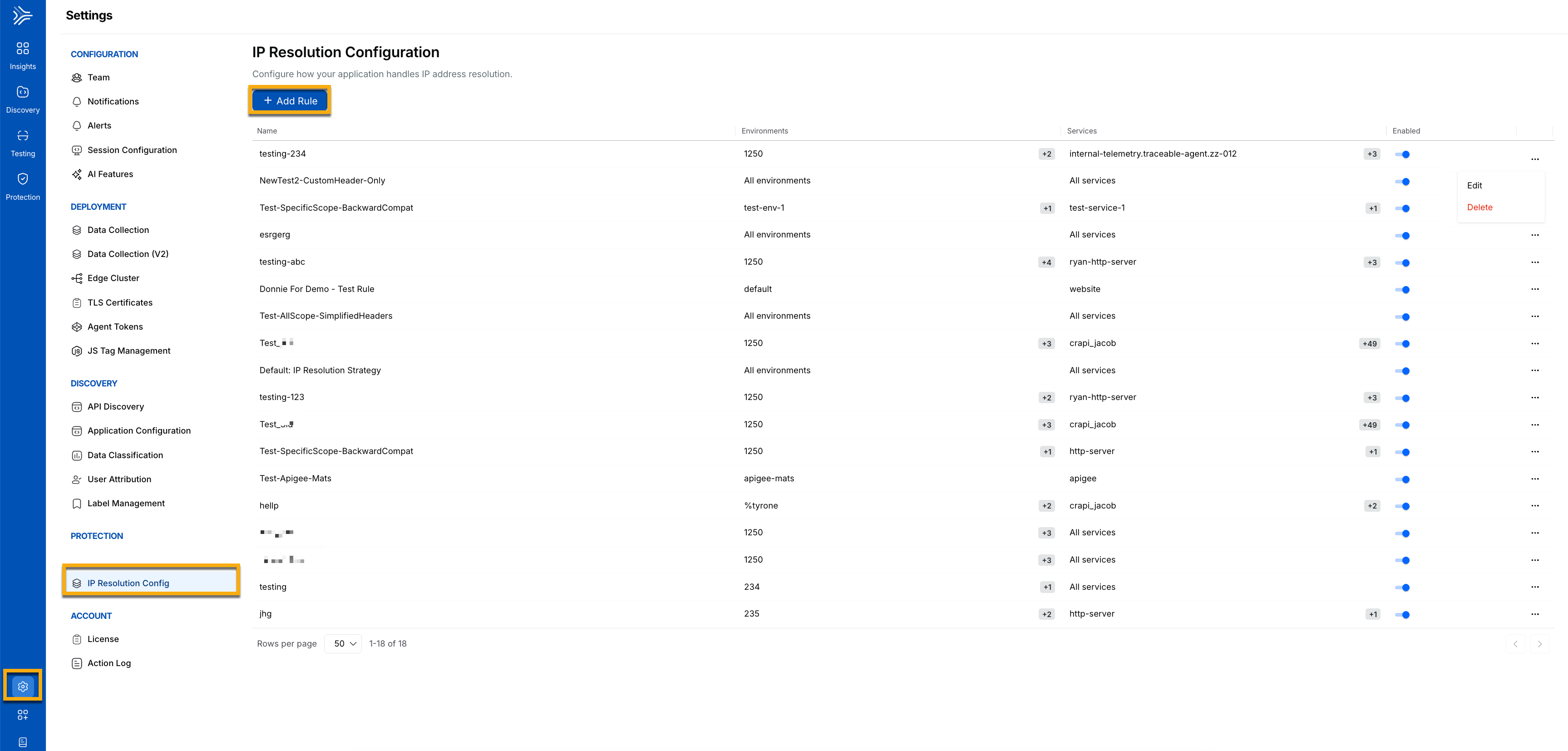
To configure IP resolution, navigate to Settings → Protection → IP Resolution Configuration, as shown below.
IP Resolution Configuration navigation
Step 3 — Add IP rule config
On the IP Resolution Configuration page, click +Add Rule. In the Add IP Rule Config window, complete the following details:
.png)
Add IP Rule Config Window
(Optional) You can choose to Evaluate all IPs for Blocking by checking the check box. If checked, Traceable evaluates all IPs for this rule config.
Specify the Name for the rule.
Select one or more Environments according to your requirements.
Select the Services according to your requirements.
Click +Add to add IP Address Locations, and complete the following details:
(Optional) You can remove internal IPs by checking the checkbox. If checked, Traceable removes internal IPs before selecting the IP headers to block.
Select the Extraction Type from the drop-down according to your requirements, for example, Keyword-based.
Raw extraction — Uses the header value directly.
Keyword-based parsing — Extracts IPs using defined prefixes, for example,
for=.Regex-based parsing — Applies advanced pattern matching for complex or variable header formats.
Select the IP Header. The value you provide for the IP Header is automatically updated, and
http.request.headeris prefixed.Specify the Preferred index for Resolution.
Specify the Parsing Split Delimiter, for example,
;.Specify the Prefix.
Specify the Suffix.
After validating your details, click Save to save your rule.
Step 4 — Configure header source priority
The following table shows the header priority order Traceable uses when determining the client IP address.
Priority | Source |
|---|---|
1 |
|
2 |
|
Note
You should only configure fallback if necessary.
Conceptual example with IP resolution
The following example demonstrates how Traceable resolves the client IP from an X-Forwarded-For header.
X-Forwarded-For: 203.0.113.5, 10.0.0.4Configured:
Header:
x-forwarded-forIndex:
0Private IP filtering: Enabled
Resolved Client IP:
203.0.113.5Now, detection and enforcement operate on the actual client.
Supported extraction methods
Traceable supports multiple IP extraction strategies to accommodate different proxy architectures and header formats. The following table describes the
Extraction Method | Recommended For | Complexity | Header and Configuration |
|---|---|---|---|
Raw Header-Based | Standard reverse proxy or CDN using X-Forwarded-For | Low |
|
Keyword-Based | RFC 7239 compliant environments | Medium |
|
Regex-Based | Complex multi-hop or mixed IPv4–IPv6 proxy chains | High |
|
Regex example for advanced use cases
The following regex pattern extracts IPv4 and IPv6 addresses from the Forwarded header while removing optional port values.
(?i)for="?\[?([A-Fa-f0-9:.]+)\]?(?::\d+)?"?Enables:
IPv4 extraction
IPv6 extraction
Port removal
Case-insensitive matching, Advanced Parsing Controls
The following table outlines the available parsing controls and their role in accurately extracting client IP addresses from request headers.
Control | Description | When to Use |
|---|---|---|
Trusted Header Selection | Restrict which headers are trusted | Prevent spoofing |
Multi-hop Index Selection | Select first, last, or a specific index | Control client vs proxy selection |
Custom Delimiters | Define non-standard separators | Custom gateway formats |
Prefix/Suffix Removal | Strip tokens like | Forwarded header parsing |
Regex Capture Groups | Extract precise IP pattern | Complex or messy chains |
After enabling, it helps you:
Monitor Threat Actor volume.
Review rate-limiting patterns.
Validate noise reduction.
Confirm no unintended traffic blocking.
Practical scenarios
The following table outlines standard real-world proxy configurations, the headers typically observed in each configuration, and the recommended IP Resolution configuration for accurately deriving the actual client IP.
Scenario | Sample Header(s) Observed | Recommended Configuration | Resolved Client IP |
|---|---|---|---|
Multiple Reverse Proxies (Most Common) |
| Header: Delimiter: Index: (first IP)Private IP Filtering: Enabled |
|
HTTPS Forwarded Header |
| Header: Extraction Method: Keyword-based Prefix: |
|
Complex Proxy Chains (IPv4 + IPv6) |
| Header: Extraction Method: Regex-based IPv4 + IPv6 Support: Enabled Port Removal: Enabled Capture Group: Extract IP only |
|
Best practices and operational impact
Proper IP Resolution configuration improves detection accuracy and helps ensure enforcement actions target the correct client. The following operational practices can help you maintain reliable client attribution and reduce the risk of misconfiguration. Applying these guidelines also helps minimize potential impact on production environments while maintaining effective security coverage.
The following are some best practices:
Trust only infrastructure-controlled headers — Prevents client-side header spoofing and false attribution.
Avoid implicit fallback behavior — Eliminates accidental use of infrastructure IPs for detection.
Use index 0 for standard
X-Forwarded-Forchains — Ensures the original client IP is selected in most proxy setups.Exclude private or internal IP ranges — Prevents load balancer or proxy IPs from being treated as client IPs.
Coordinate changes with the networking team — Ensures header order and proxy behavior are validated.
Deploy during a controlled window — Minimizes risk if enforcement behavior changes.
This ensures Traceable operates on true client identity rather than shared infrastructure signals.