APIs rarely exist in a single place. Long before an endpoint serves production traffic, it is typically defined in source code, documented in an API specification, tested in development environments, and eventually observed at runtime. Each stage provides a different view of the same API, with its own metadata and security insights.
Traceable continuously discovers APIs across these stages to help you build a complete inventory. It identifies APIs from connected code repositories before deployment, from uploaded API specifications that describe their intended behavior, and from live traffic once they are deployed. Together, these discovery methods provide visibility throughout the API lifecycle, from development to production. For more information, see Discovery.
What you will learn from this topic
By the end of this topic, you will be able to understand:
The purpose and structure of API discovery from multiple sources, and what each source contributes on its own.
The way Traceable determines that two discoveries, arriving from different sources, describe the same underlying API.
The steps to filter and review an API's correlated sources.
API discovery from multiple sources
An API typically appears in three stages during its lifecycle. Traceable discovers it at each stage through a different capability, providing visibility before deployment, through documentation, and in production. API can be discovered from the following three sources:
Code Repositories — A developer first defines an endpoint in source code, for example, POST /api/v2/payments. If your repositories are connected, Traceable scans the repository and identifies the endpoint before it is deployed or receives any traffic. For more information, see API Discovery from code.
Documentation — An API endpoint is often documented separately in an OpenAPI specification generated through a CI pipeline or in a Postman collection maintained by the development team. API Documentation and Inspector ingest these specifications, parse their structure, and identify sensitive data before the API reaches production. For more information, see Documentation and Inspector.
Live Traffic — After deployment, Traceable observes the endpoint in live traffic. It captures real requests and responses, including headers, payloads, authentication behavior, and runtime risk signals.
API correlation
Correlation determines whether discoveries from different sources represent the same API. Traceable evaluates multiple attributes and signals to identify related discoveries across Live Traffic, Documentation, and Code. No single attribute is always sufficient for correlation. APIs can be represented differently across source code, API specifications, and runtime traffic. As a result, related discoveries can be correlated even when some attributes do not exactly match.
Discovery source correlation
Traceable can correlate related discoveries across the following sources:
Live Traffic and Code — A Live Traffic discovery can be correlated with a related Code discovery.
Live Traffic and Documentation — A Live Traffic discovery can be correlated with a related Documentation discovery.
Live Traffic and Live Traffic — Live Traffic discoveries can be correlated when they represent the same API across different environments, such as staging and production.
Code and Documentation — Code and Documentation discoveries can also be correlated in supported scenarios.
Correlation criteria
Traceable evaluates multiple attributes to determine whether discoveries from Code, Documentation, and Live Traffic represent the same API:
API identity — Traceable considers the HTTP method, path, service name, and environment when identifying an API. For example, discoveries for POST /api/v2/payments from payments-repo, an uploaded OpenAPI specification, and production traffic can be correlated when they resolve to the same API identity.
Path matching — Traceable normalizes API paths before correlating discoveries. Parameter names do not need to match exactly. For example, GET /user/{userId} and GET /user/{ID} can be recognized as the same API even though the parameter names differ.
Unmatched discoveries — A discovery does not need a matching discovery from another source to appear in Unified Inventory. For example, if Traceable discovers an API only in Code, it still appears as an individual asset on the All Assets page. The Discovery Sources column identifies it as a Code discovery.
This can help you identify APIs that may not yet be deployed or that are not observed through runtime traffic by design. To view the repositories that contribute Code discoveries, navigate to Discovery → Settings → Repositories.
Discovery source filter
Use the Discovery Sources filter on the All Assets page to view APIs from a specific discovery source. For example, you can use the filter to review APIs discovered from Documentation that have not been observed in traffic, or APIs discovered from Code before they reach runtime. The filter includes three options:
Discovery Source | Description |
|---|---|
Live Traffic | APIs observed in production or non-production traffic. |
Documentation | APIs discovered from an uploaded specification. |
Code | APIs discovered from a connected code repository, whether or not they have reached runtime yet. |
An API-type asset discovered only in code, without a corresponding runtime discovery, still appears in the table. Traceable labels it as originating from code so that you can identify assets that may not yet be deployed, or that bypass runtime collection entirely.
View an asset's correlated sources
To review an API-type asset's full correlation and source-specific details, complete the following details:
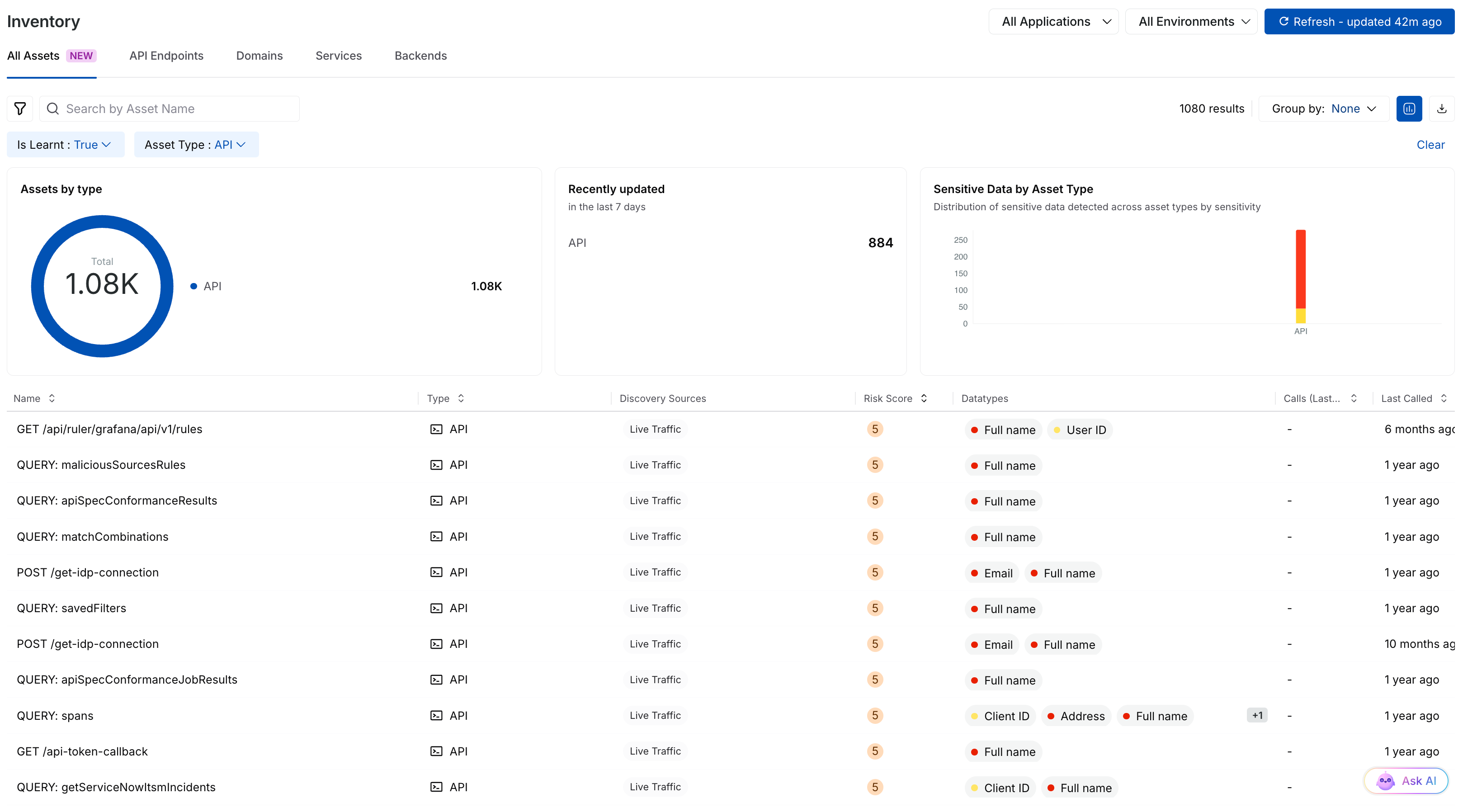
Discovery Sources
Click the API endpoint, or click a specific source icon in its Discovery Sources column.
Use the source selector at the top of the detail view to choose a specific source.
.png)
Discovery Source Details
The value of correlation
The same API can be discovered from multiple sources during its lifecycle. Historically, Traceable treated each discovery as a separate asset, even when the discoveries represented the same API. For example, POST /api/v2/payments could appear as three separate entries on the All Assets page: one from Code, one from Documentation, and one from Live Traffic. You would need to compare the attributes to determine whether these entries represented the same API.
Correlation resolves this by bringing these entries together into a single logical API. Instead of three disconnected records that you have to reconcile yourself, you see one entity that carries the combined context from every source that contributed to it.
API correlation scenarios
The All Assets page in Traceable brings together API information discovered from Live Traffic, Documentation, and Code Repositories. Traceable correlates API entities from different sources when they represent the same logical API, allowing you to view information from multiple sources together.
Correlation does not require all three sources to identify an API. Traceable can correlate an API across any combination of the available sources. When a source does not contain a matching API, Traceable indicates that no correlated API was found for that source.
The following scenarios show how correlated APIs are presented on the All Assets page.
Scenario 1 — API correlated across Live Traffic detections
When Live Traffic detects the same API in multiple environments, Traceable associates the detections with the same logical API and displays the available environments for that API. The following table describes the different attributes of the correlated sources:
Attribute | Value |
|---|---|
API path |
|
HTTP method |
|
Type | REST |
Live Traffic | API detected |
Environment 1 |
|
Environment 2 |
|
Documentation | Not available |
Code Repository | Not available |
You can switch between environments to view the API in the context of a specific environment while retaining the relationships between Live Traffic detections. The following screenshot shows the correlation between Live Traffic:
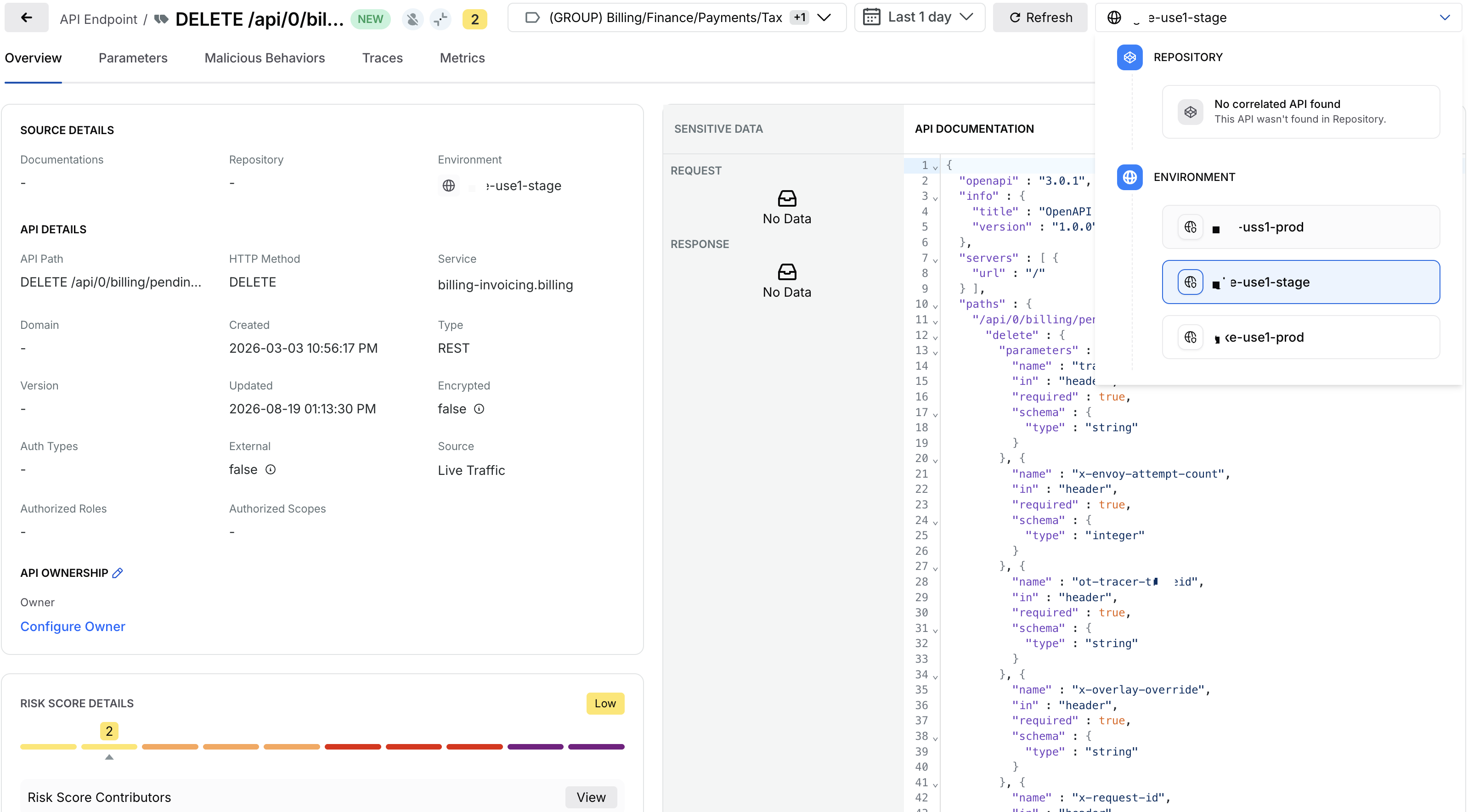
Live Traffic Correlation
Note
When all identifying attributes, including API path, service, and environment, are identical, Traceable combines the detections into a single API entity. This is a merge rather than a correlation because there are no separate API entities to relate. Correlation applies when Traceable establishes a logical relationship between distinct API entities.
Scenario 2 — API correlated between Live Traffic and Documentation
When Live Traffic detects an API and the same API is declared in Documentation, Traceable correlates the API entities from both sources. The following table describes the different attributes of the correlated sources:
Attribute | Value |
|---|---|
API path |
|
HTTP method |
|
Type | REST |
Environment |
|
Live Traffic | API detected |
Documentation |
|
Code Repository | No correlated API found |
The correlated API combines information contributed by the available sources. Live Traffic provides information about the API observed in the environment, while API Documentation provides the declared API definition and parameters. If no matching API is found in the Code Repository, Traceable displays No correlated API found for that source while retaining the correlation between Live Traffic and Documentation. The following screenshot shows the correlation between Live Traffic and Documentation:
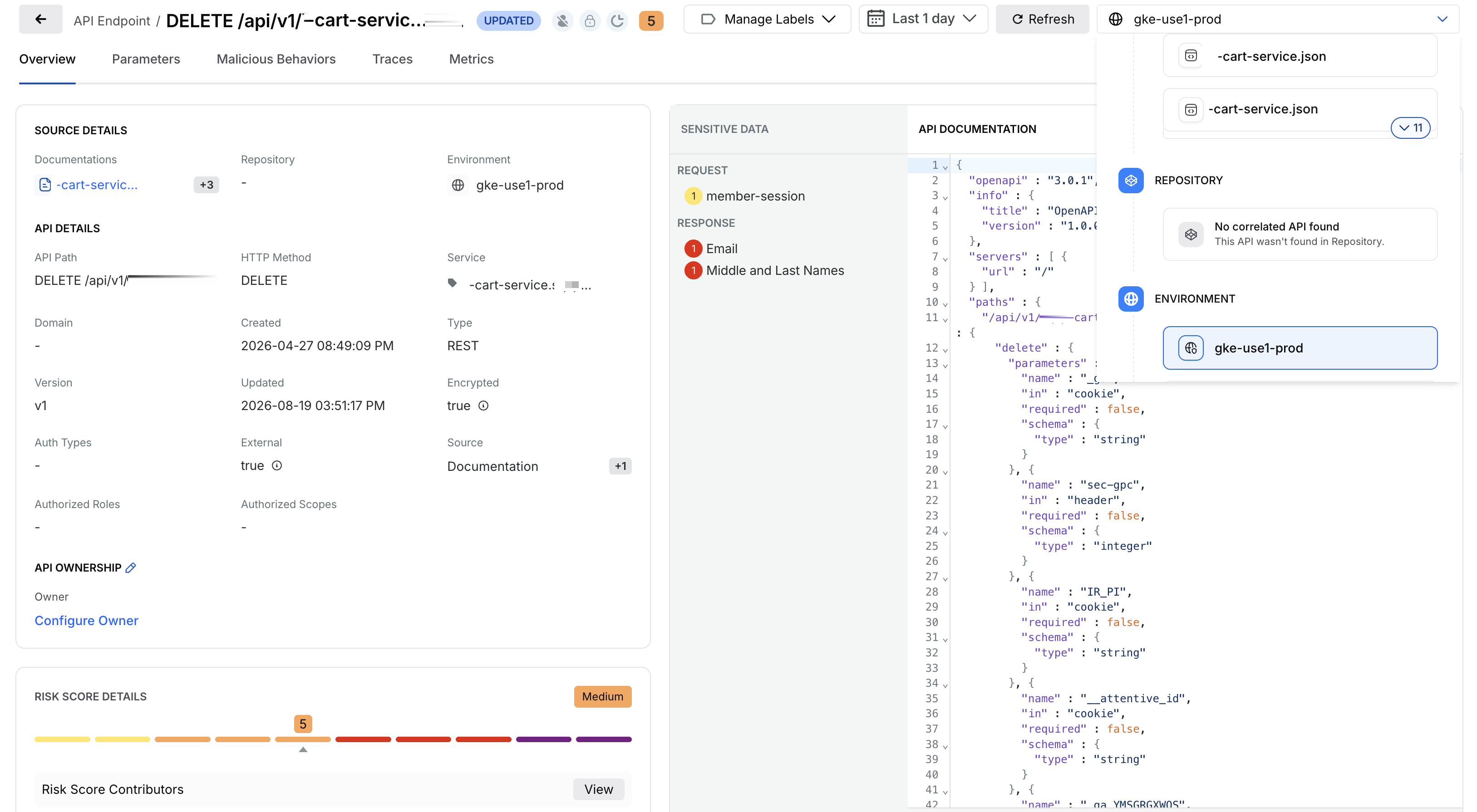
Live Traffic and Documentation Correlation
Scenario 3 — API correlated between Live Traffic and Code Repository
When Live Traffic detects an API and the corresponding API is identified in a Code Repository, Traceable correlates the API entities from both sources. The following table describes the different attributes of the correlated sources:
Attribute | Value |
|---|---|
API path |
|
HTTP method |
|
Type | REST |
Environment |
|
Live Traffic | API detected |
Code Repository |
|
Documentation | No correlated API found |
The correlated API combines information contributed by the available sources. Live Traffic provides information about the API observed in the environment, while the Code Repository provides information about the corresponding API implementation. If no matching API is found in API Documentation, Traceable displays No correlated API found for that source while retaining the correlation between Live Traffic and the Code Repository. The following screenshot shows the correlation between Live Traffic and Code:
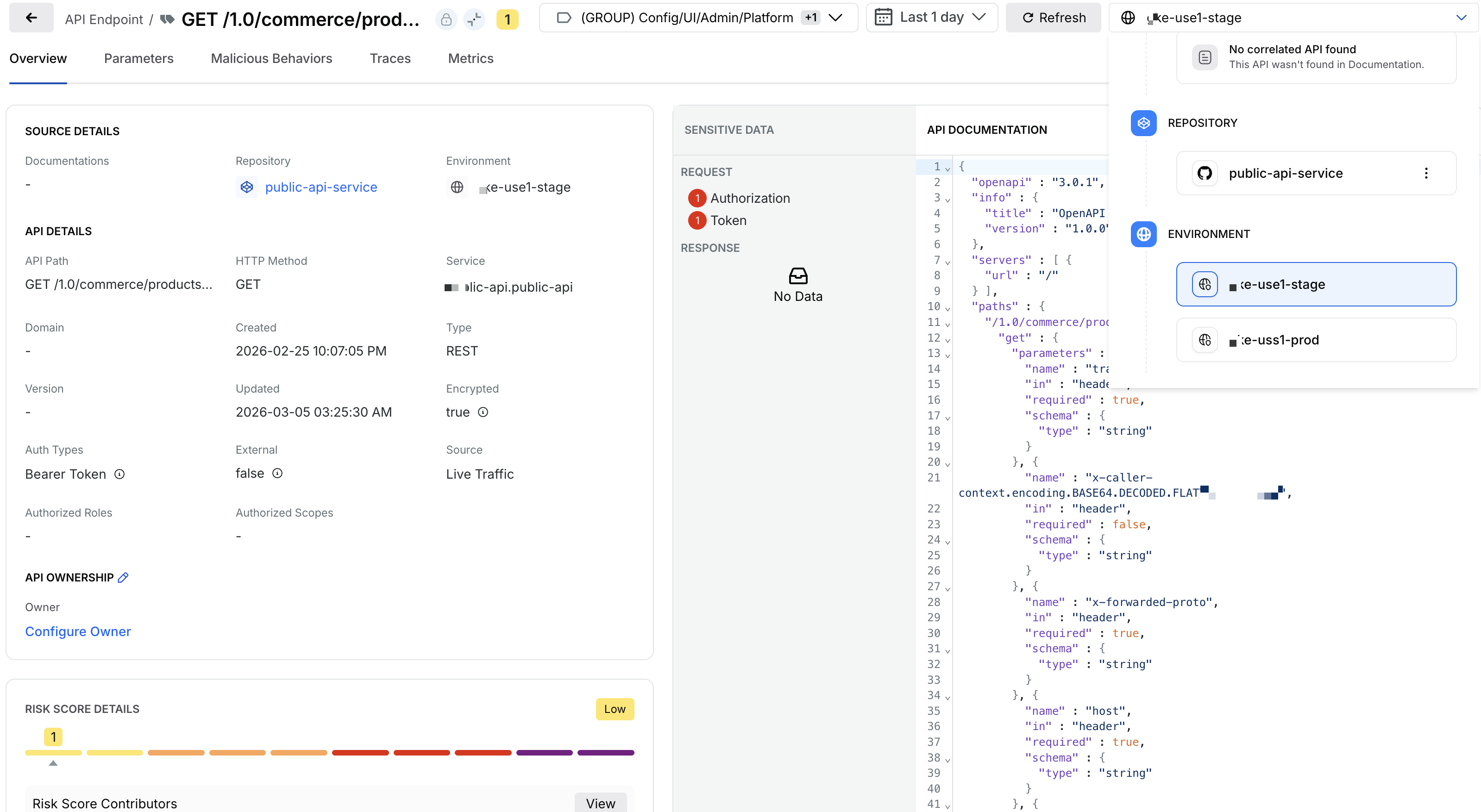
Live Traffic and Code Correlation
Scenario 4 — API correlated across Live Traffic, Documentation, and Code Repository
When an API is identified by Live Traffic, Documentation, and a Code Repository, Traceable correlates the API entities from all three sources into a single logical API. The following table describes the different attributes of the correlated sources:
Attribute | Value |
|---|---|
API path |
|
HTTP method |
|
Type | REST |
Environment |
|
Live Traffic | API detected |
Documentation |
|
Code Repository |
|
The following screenshot shows all the different sources correlated:
.png)
All Sources Correlation
Source-specific context
Correlation connects related discoveries without replacing the information provided by each source. Code findings remain associated with the repository where the API was defined, specification metadata remains associated with the source documentation, and runtime information remains associated with the traffic that exposed the API. This lets you view related discoveries together while retaining the context of each discovery's origin.