Traceable's advanced alert conditions enable you to create precise Discovery alerts by evaluating resource attributes and detecting meaningful changes over time. Instead of triggering notifications for every event, you can define conditions based on attribute values, compare previous and updated values, or combine multiple criteria using logical operators. The following table describes the different available attributes, event type, and its description:
Category attributes | Event Type | Description |
|---|---|---|
| Provides visibility into new and modified API endpoints identified during discovery. | |
| Provides visibility into backend services identified during discovery. | |
| Provides visibility into API endpoints belonging to third-party integrations. | |
| Provides visibility into discovered MCP tools and their configurations. | |
| Provides visibility into domains identified during discovery, including additions and removals. | |
| Provides visibility into third-party services identified during discovery. | |
| Provides visibility into security issues identified across your API inventory. |
Advanced alert configuration sample scenarios
The following sample scenarios discuss how to configure condition groups and conditions for discovery alerts when you select the Event Type as Update:
Scenario 1 — Notify when an API's risk score increases significantly
You wish to be notified when an API's risk score increases from low to high risk so you can investigate newly introduced security risks. To configure this, create a condition group with Match All, and add the following conditions:
.png)
Discovery Use-case Alerts
Attribute | Operator | Value |
|---|---|---|
Previous Risk Score | < | 2 |
Updated Risk Score | > | 7 |
This configuration ensures that Traceable evaluates whether an API's risk score has increased and generates an alert only when the score exceeds the defined threshold. As a result, you receive notifications for meaningful risk escalations instead of every score update.
Scenario 2 — Notify when sensitive APIs meet different exposure conditions
You wish to be notified when an external API handles regulated data, or when an internal API begins exposing highly sensitive credentials. To configure this, create two condition groups with Match Any, and add the following conditions:
Condition Group 1 (Match All)
Attribute | Operator | Value |
|---|---|---|
External | = | True |
Data Type | In | PII, PCI, PHI |
Condition Group 2 (Match All)
Attribute | Operator | Value |
|---|---|---|
External | = | False |
Data Type | In | Secrets, Credentials |
This configuration evaluates two independent security conditions within a single alert. Traceable generates an alert notification when either an externally exposed API processes regulated data or an internal API exposes highly sensitive credentials, eliminating the need to create and maintain separate alerts for each scenario.
Scenario 3 — Notify on issue status transitions
You wish to be notified when an issue moves from an active state to a resolved or accepted state, so you can track remediation progress without manually monitoring every status change. To configure this, create a condition group with Match All, and add the following conditions:
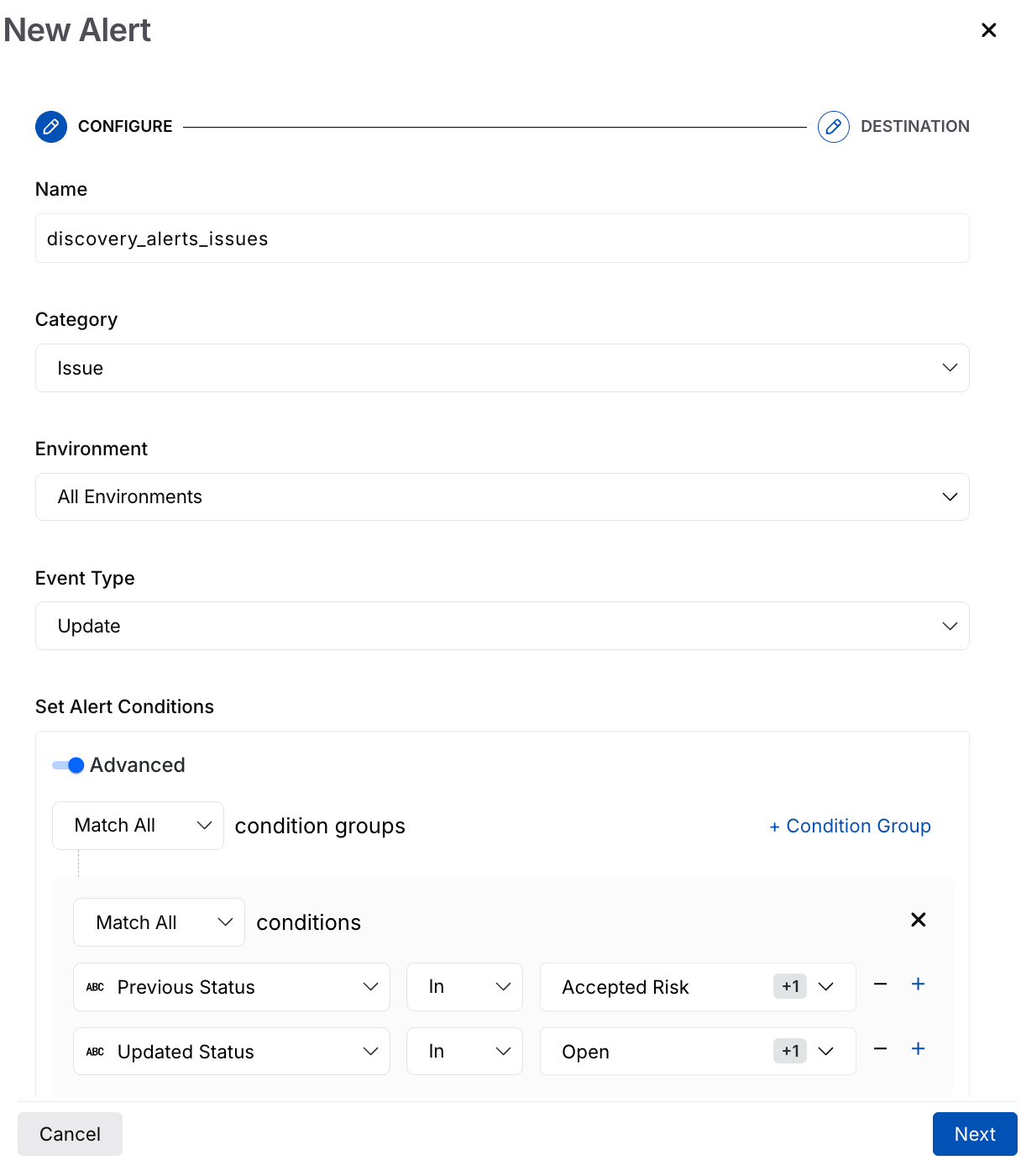
Discovery Alert Use-Case
Attribute | Operator | Value |
|---|---|---|
Previous Status | In | Accepted Risk, Under Review |
Updated Status | In | Open, Reopened |
This configuration evaluates both the current and updated issue status to detect specific status transitions. By combining the conditions using the Match All operator, Traceable generates a notification only when an issue moves from one of the specified current states to one of the defined target states, reducing notifications for unrelated status changes.
Scenario 4 — Notify based on issue severity and traffic source
You wish to prioritize issues found in live traffic over issues found through other sources by applying different severity thresholds depending on where the issue was detected. To configure this, create two condition groups with Match All and add the following conditions, and then combine them using Match Any at the top level.
.png)
Discovery Alert Use- Case
Condition Group 1 (Match All)
Attribute | Operator | Value |
|---|---|---|
Updated Severity | In | Medium, Critical |
Updated Source | In | AST |
Condition Group 2 (Match All)
Attribute | Operator | Value |
|---|---|---|
Updated Severity | In | Critical, High |
Updated Source | In | Live Traffic |
This configuration evaluates two severity-based conditions for issues detected through Live Traffic. Traceable generates a notification when an issue is detected in live traffic with Critical, Medium, or Low severity. By combining the condition groups with the Match Any operator, a single alert can monitor multiple severity thresholds while maintaining a common source condition, reducing the need for separate alert configurations.
Note
This scenario applies similarly to other issue categories, such as third-party, backend, domain, and MCP tool service issues, since these categories share the same severity and source attributes.