The MCP Tool risk score helps you assess the security posture of discovered MCP tools by combining the likelihood and impact of exploit indicators into a single severity score.
Traceable calculates this score using configurable likelihood and impact contributors, such as tool access configuration, detected issues, response data sensitivity, operational capability, and contextual labels. The resulting values are mapped through a lookup table to determine the final risk severity.
This scoring framework provides consistent risk visibility across APIs and AI assets, helping you prioritize remediation based on exposure level, privilege capability, and sensitive data handling.
What will you learn in this topic?
By the end of this topic, you will understand:
How Traceable calculates MCP tool risk scores.
The contributors to the risk score of the MCP tools in your application.
Understand the MCP tool risk score
Traceable derives the MCP tool risk score from two components:
Likelihood of Exploit
Impact of Exploit
Traceable calculates each component independently using the configurable contributor values. Further, the final score is determined using the Risk Lookup Table.
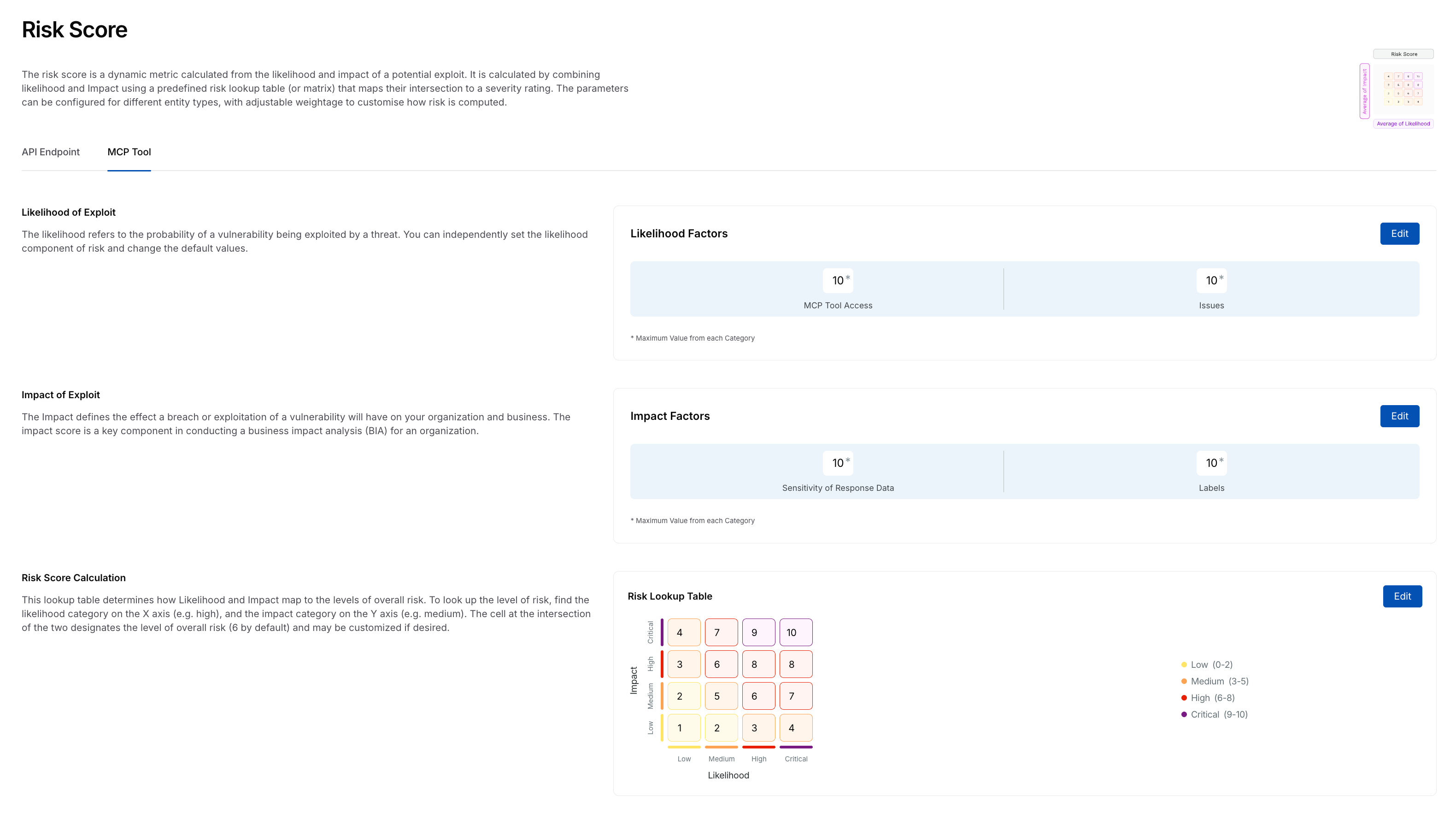
MCP Tool Risk Score
Traceable provides default values for each component that conform to industry standards; however, you can modify them. This enables you to assess the MCP tools and their associated risks against your organizational requirements.
The following sections highlight these components and their contributors.
Likelihood represents how easily an MCP tool can be accessed and exploited based on its exposure and detected weaknesses. Traceable calculates the likelihood score using the following contributors:
MCP Tool Access — This contributor evaluates how the MCP tool is exposed and protected. The likelihood of this contributor increases when a tool:
is externally accessible
uses weaker authentication mechanisms
is unauthenticated
is not encrypted
MCP tools that use strong authentication and encryption contribute less to the likelihood score.
Traceable categorizes the scores for these contributors into:
External — For external MCP tools
Internal — For internal MCP tools
Issues — Detected issues associated with an MCP tool contribute directly to the likelihood score. The severities included as part of this score are:
Critical
High
Medium
Low
High and Critical issues increase the likelihood score. Traceable selects the highest applicable severity when calculating this contribution.
Traceable assigns severities to issues based on the MCP policies you configure. For more information, see AI and MCP Policies.
Additionally, you can enable or disable these contributors according to your requirements. Upon disabling, Traceable no longer considers the contributor when allocating risk scores.
Impact represents the potential effect on your environment if an MCP tool is misused or compromised. Traceable calculates the impact score using the following contributors:
Sensitivity of Response Data — This contributor evaluates the sensitivity classification of data returned by the MCP tool. The severities included as part of this score are:
Critical
High
Medium
Low
MCP tools that expose higher sensitivity data contribute more to the risk score.
Labels — Labels enable you to adjust the impact score based on the MCP tool’s importance. For example, you can use labels to indicate tools that:
support critical workflows
interact with sensitive environments, such as production or sandbox
require additional monitoring or priority
If multiple labels are applicable to a tool, the highest configured value contributes to the impact score.
Traceable uses default labels and assigns risk scores to them; however, you can click Edit Labels to add labels according to your requirements. For information on creating labels, see Label Management.
You can enable or disable these contributors according to your requirements. Upon disabling, Traceable no longer considers the contributor when allocating risk scores.
After calculating likelihood and impact scores, Traceable determines the final MCP Tool risk score using the Risk Lookup Table.
The lookup table maps combinations of likelihood and impact values to a numeric score ranging from 0 to 10. This score determines the severity level assigned to the MCP tool.
You can modify the lookup table values to align scoring behavior with your organization’s risk modeling. For more information, see the section below.
Update the MCP tool risk score
While Traceable defines risk scores by default, you can customize the MCP tool risk scores to align with your internal policies. You can do this by updating the contributor values and modifying the risk lookup table. Any modifications you make are applied across the Traceable platform for MCP tool risk evaluation.
Note
To update the risk scores, you must have the necessary RBAC permissions (Module Level Access → Discovery → Settings). For more information, see Teams and Roles - RBAC.
To update the risk score for an MCP tool, complete the following steps:
Step 1 — Select component
Navigate to Discovery → Settings → Risk Score → MCP Tool tab.
Click Edit in either of the following sections:
Likelihood of Exploit
Impact of Exploit
Risk Score Calculation
In the Edit Contributors slide-out panel, you can edit the risk score values corresponding to each contributor. The tabs in the step below highlight these contributors.
Step 2 — Modify risk score
Traceable categorizes the likelihood factors into the following two categories:
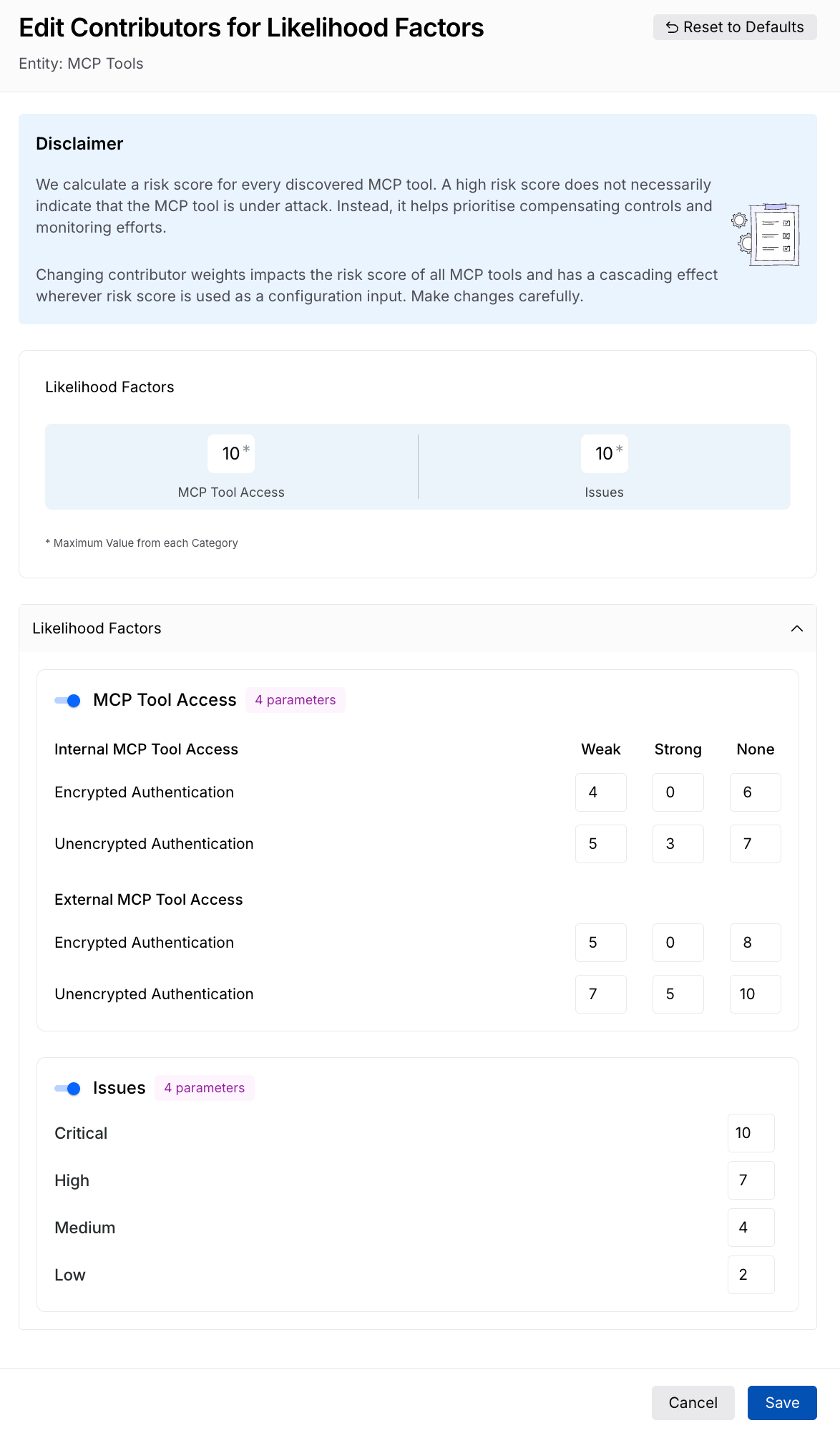
Update Risk Score for Likelihood Factors
MCP Tool Access — Traceable classifies MCP tools into internal and external, as mentioned above, and provides you with the following risk score allocations:
Weak — The risk score you wish to assign to tools having weak authentication, usually a higher value.
Strong — The risk score you wish to assign to tools having strong authentication, usually a lower value.
None — The risk score you wish to assign to tools having no authentication, usually the highest value.
Issues — Traceable classifies Issues by severity, with each having a risk score:
High — The risk score you wish to assign to issues having High severity, usually a higher value.
Critical — The risk score you wish to assign to issues having Critical severity, usually the highest value.
Medium — The risk score you wish to assign to issues having Medium severity, usually a lower value.
Low — The risk score you wish to assign to issues having Low severity, usually the lowest value.
Once you have made the necessary changes, click Save.
Traceable categorizes the impact factors into the following two categories:
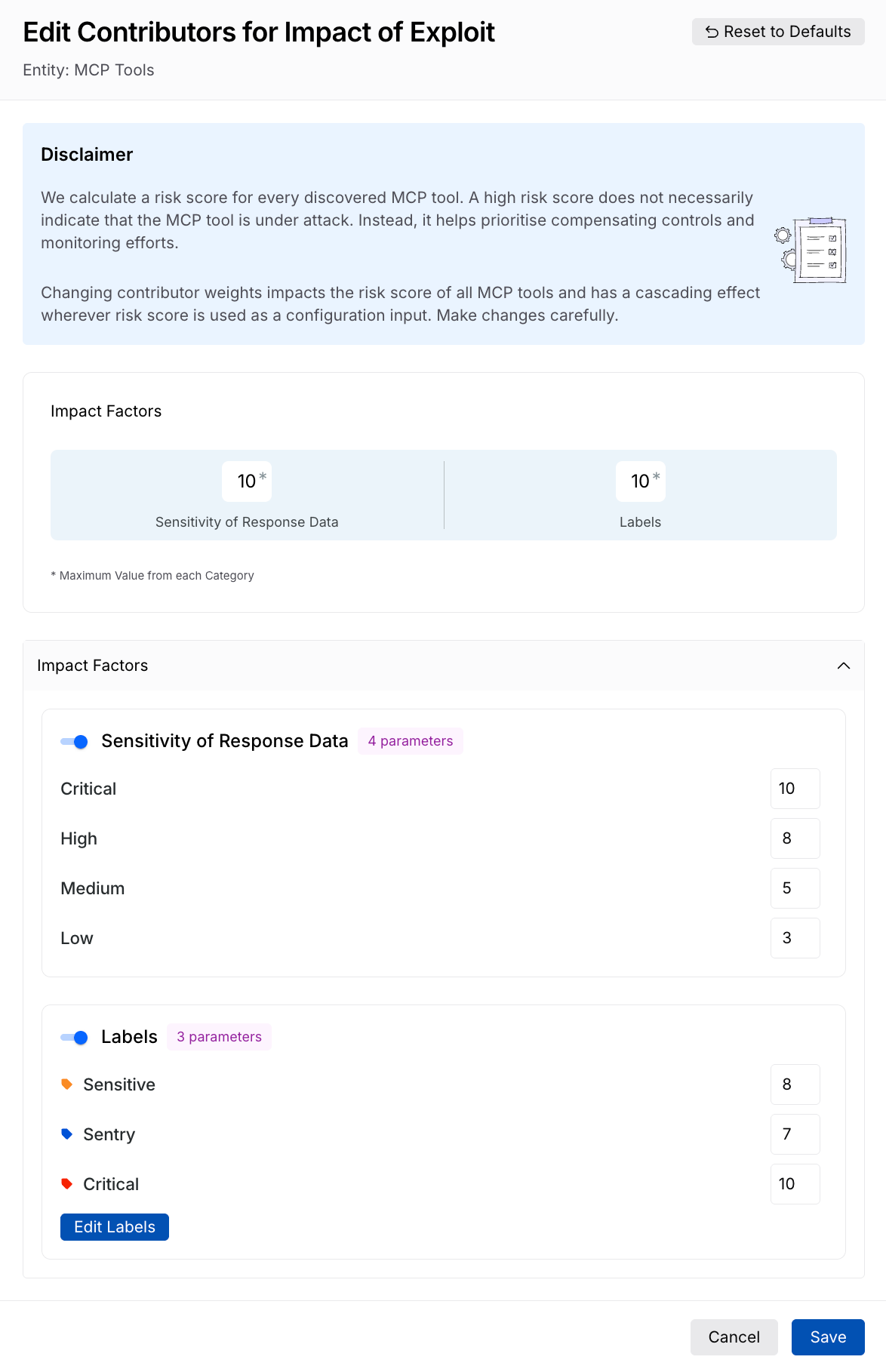
Update Risk Score for Impact of Exploit
Sensitivity of Response Data — Traceable classifies sensitivity into 4 levels (Critical, High, Medium, and Low), each with a risk score typically lower than the previous one. You can specify the risk score you wish to assign, according to your requirements.
Labels — Traceable adds the Sensitive, Sentry, and Critical labels by default, with each having a different risk score. You can click Edit Labels to add more labels. Further, you can specify the risk score you wish to assign, according to your requirements.
Once you have made the necessary changes, click Save.
Traceable, based on the risk score you specify in the Likelihood of Exploit and Impact of Exploit sections, specifies the scores in the Risk Lookup table. You can modify the values in the table according to your requirements.
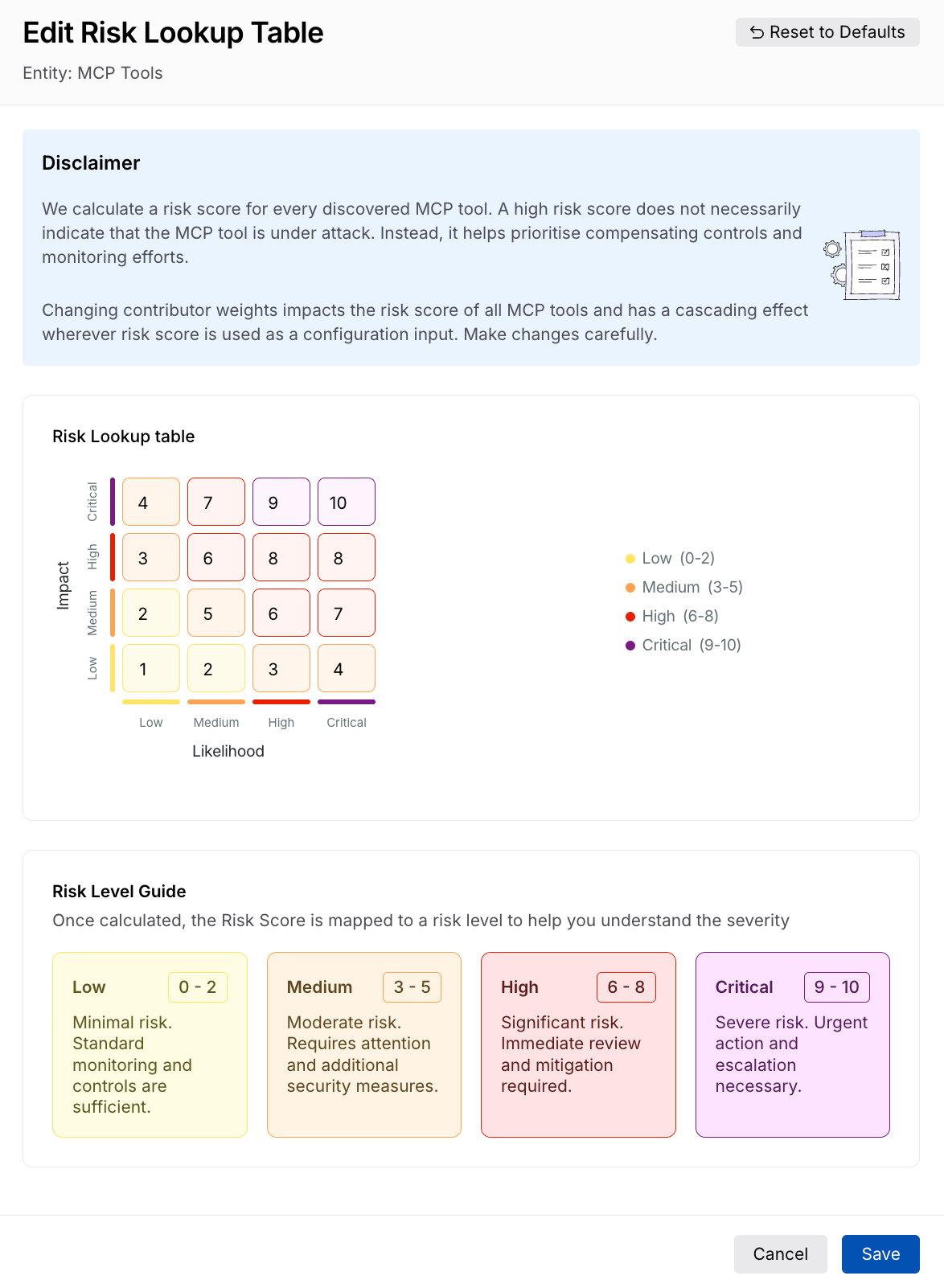
Update Risk Lookup Table
Once you have made the necessary changes, click Save.
Resetting risk scores to default
Traceable, by default, specifies risk scores for each component based on industry standards. While you can modify the risk score using the steps mentioned above, you can also restore the scores to their default value. To do this, complete the following steps:
Navigate to Discovery → Settings → Risk Score → MCP Tool tab.
Click Edit in either of the following sections:
Likelihood of Exploit
Impact of Exploit
Risk Score Calculation
In the slide-out panel’s top right corner, click Reset to Defaults.
In the confirmation dialog, click Confirm.
Traceable resets the scores to the default values.