Custom Authentication enables flexible, rule-based user attribution for applications that use non-standard or proprietary authentication mechanisms. It allows you to define how user identity is extracted, transformed, and mapped when Basic or token-based authentication methods do not align with your architecture.
What will you learn in this topic?
By the end of this topic, you will be able to:
Understand how custom authentication enables flexible, rule-based user attribution beyond Basic and token-based methods.
Identify when to use custom authentication and how it supports complex or non-standard authentication flows.
Configure scoped attribution rules across environments, services, and URL patterns.
Extract and transform identity attributes using conditions, multi-step transformations (Regex, Base64, JSON Path, JWT claims), and preview validation.
Understand custom authentication user attribution
Custom Authentication user attribution enables you to explicitly define how user identity is derived from incoming API traffic. Instead of relying on predefined identity patterns, you configure deterministic extraction logic based on the actual structure of your requests. User identity can be resolved from headers, cookies, request payload fields, API keys, or encoded values. The configuration supports structured parsing, regex-based extraction, decoding operations such as Base64, and chained transformations where required. This makes it suitable for environments where identity data is embedded in non-standard locations or follows application-specific formatting. The following table provides a structured overview of why custom authentication is implemented, when it is technically appropriate, and how it can be applied effectively within complex application architectures:
Why use it? | When to use? | How can you leverage it? |
|---|---|---|
Provides complete flexibility to define custom logic for identifying users beyond standard authentication schemes. Enables accurate user attribution even in complex or multi-step authentication flows. Supports advanced identity enrichment with custom attributes and rule-level logic. Maintains attribution consistency across environments and services with scoped configuration. | When your application uses proprietary, API key–based, session-based, or non-standard authentication mechanisms. When Basic or JWT-based authentication does not meet your business or architectural requirements. When identity information is embedded in nested JSON, encoded cookies, refresh flows, or multiple request components. When you need granular control over where attribution applies (specific environments, services, or URL patterns). | Extract user identity from headers, cookies, request bodies, response payloads, or encoded fields using configurable rules. Chain transformations (Regex, Base64, JSON Path, JWT payload claims) to decode, normalize, and map identity attributes precisely. Create multiple attributes from a single request to enhance visibility. Strengthen threat detection, investigation, and compliance by tying anomalies and security events to enriched, custom-defined identities. |
Steps to configure
To configure custom authentication, complete the following steps:
Step 1 — Define the authentication scope
Specify the Name.
(Optional) Specify a Description for the configuration.
Select the Environment(s) in which you wish to apply the configuration according to your requirements.
Select the Service(s) on which Traceable should apply the configuration. Depending on your requirements, you can select all or specific services from the drop-down menu.
(Optional) Specify the URL Regex if you wish to provide a granular scope for user attribution.
Click Next.
.png)
Step 2 — Define the authentication attributes
Traceable includes a Custom JSON toggle in the Define Scope section of the Configure User Attribution window, which you can enable before defining the attributes.
Note
If you wish to create a Custom User Attribution rule beyond the available configuration options, contact support@traceable.ai.
Custom JSON enabled
You can choose to enable the Custom JSON toggle (.png) ) and define your attributes according to your requirements.
) and define your attributes according to your requirements.
User ID/User Role/User Scope/Auth Type — Once enabled, you can specify a valid Custom JSON for your selected attribute, according to your requirements.
Custom — Once enabled, you can specify the Attribute Key you wish to attribute as part of the authentication and a valid Custom JSON, as shown below:
.png)
Custom JSON Toggle Enabled
Custom JSON disabled
You can choose to continue without enabling the Custom JSON toggle (.png) ) and define your attributes according to your requirements.
) and define your attributes according to your requirements.
From the list of available attributes, select the one(s) you wish to add. Depending on the attribute you select, complete the following steps:
User ID/User Role/User Scope/Custom — You can add one attribute each for User ID, User Role, and Auth Type, along with multiple Custom attributes.
You can select the checkbox if you wish to Obfuscate the value post-attribution within the platform.
(Optional) Click + Add Condition, then select and specify the location, key, operator, and value to use when Traceable checks spans for a match. If a span satisfies the condition, Traceable further evaluates the remaining configurations.
Select the Location and specify the key where Traceable can find the attribute. For example, Request Header.
(Optional) Click + Add Value Transformation to add either of the following custom transformations:
Regex Capture Group — This transformation enables you to extract specific parts of a string or value that match the pattern you define.
Base64 Decoder — This transformation enables you to convert encoded Base64 data back to its decoded or original format.
JSON Path — This transformation enables you to navigate and select a specific key within a nested JSON structure.
JWT Payload Claim — This transformation enables you to extract the attribute present in the JWT payload. You can also reorder the transformations according to your requirements. Traceable evaluates them in order, from top to bottom. Repeat the above steps to add one or more attributes, or complete the steps below to add the Auth Type attribute, according to your requirements.
.png)
Custom JSON Toggle Disabled Attributes
Auth Type — You can specify the Authentication Type according to your requirements.
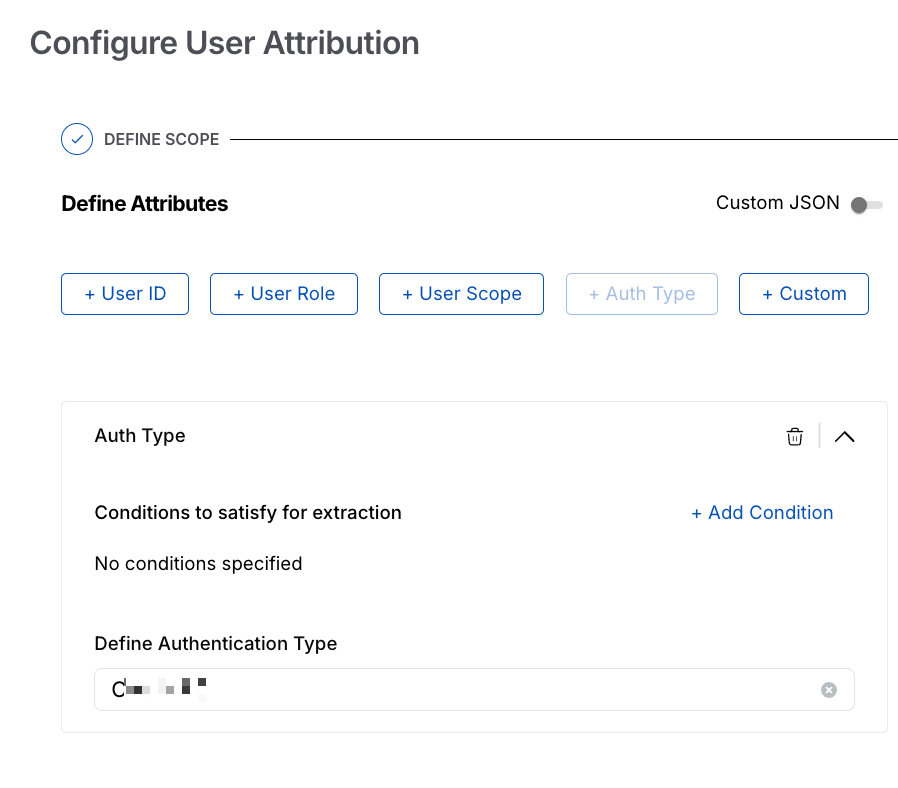
Custom JSON Toggle Disabled Auth Type
Note
The preview option is not supported in Custom User Attribution.
After verifying the details, click Submit.
Example and Demo
The following examples illustrate practical custom user attribution configurations across different request patterns. Each example demonstrates how attribute projection, transformations, and conditional logic can be combined to derive meaningful identity context from API traffic
Example 1
The following JSON shows how to parse basic auth type and append the auth type:
{
  "projector": {
    "attributeProjector": {
      "attributeKey": "http.request.header.authorization-token",
      "attributeRule": {
        "projector": {
          "regexCaptureGroupProjector": {
            "regexCaptureGroup": "(.*)",
            "attributeRule": {
              "projector": {
                "base64Projector": {
                  "attributeRule": {
                    "projector": {
                      "regexCaptureGroupProjector": {
                        "regexCaptureGroup": "(.*):",
                        "attributeRule": {
                          "initialActions": [
                            {
                              "attributeAddition": {
                                "attributeKey": "enduser.id",
                                "valueProjectionRule": {
                                  "projector": {
                                    "noOpProjector": {
                                    }
                                  }
                                }
                              }
                            },
                            {
                              "attributeAddition": {
                                "attributeKey": "enduser.id.rule",
                                "valueProjectionRule": {
                                  "projector": {
                                    "valueProjector": {
                                      "value": "basic-auth-rule-id"
                                    }
                                  }
                                }
                              }
                            },
                            {
                              "attributeArrayAppend": {
                                "attributeKey": "traceableai.auth.types",
"valueProjectionRule": {
                                  "projector": {
                                    "valueProjector": {
                                      "value": "Basic"
                                    }
                                  }
                                }
                              }
                            }
                          ]
                        }
                      }
                    }
                  }
                }
              }
            }
          }
        }
      }
    }
  }
}
Example 2
The following JSON shows how to configure the role separators for user attributes:
{
  "projector": {
    "attributeProjector": {
      "attributeKey": "http.request.header.authorization",
      "attributeRule": {
        "initialActions": [
          {
            "attributeAddition": {
              "attributeKey": "enduser.role.delimiter",
              "valueProjectionRule": {
                "projector": {
                  "valueProjector": {
                    "value": ","
                  }
                }
              }
            }
          }
        ]
      }
  }
  }
}
Example 3
The following JSON shows how you can preserve the user attribution across session refresh:
{
  "projector": {
    "conditionalProjector": {
      "predicate": {
        "attributePredicate": {
          "namePredicate": {
            "operator": "COMPARISON_OPERATOR_EQUALS",
            "value": "http.url"
          },
          "valuePredicate": {
            "operator": "COMPARISON_OPERATOR_MATCHES_REGEX",
            "value": ".*/v1/oauth2/token"
          }
        }
      },
      "attributeRule": {
        "projector": {
          "attributeProjector": {
            "attributeKey": "http.response.body",
            "attributeRule": {
              "projector": {
                "jsonProjector": {
                  "jsonPathRule": {
                    "key": "$.refresh_token",
                    "attributeRule": {
                      "initialActions": [
                        {
                          "attributeAddition": {
                            "attributeKey": "session.new.refresh.id",
                            "valueProjectionRule": {
                              "projector": {
                                "noOpProjector": {
                                }
                              }
                            }
                          }
                        },
                        {
                          "attributeAddition": {
                            "attributeKey": "session.new.test.id",
    "valueProjectionRule": {
                              "projector": {
                                "noOpProjector": {
                                }
                              }
                            },
                            "allowOverwrite": true
                          }
                        }
                      ]
                    }
                  }
                }
              }
            }
          }
        }
      }
    }
  }
}
Example 4
The following JSON shows how you can normalize the encoded cookie strings for user extractions
{
  "projector": {
    "attributeProjector": {
      "attributeKey": "http.request.header.cookie",
      "attributeRule": {
        "projector": {
          "cookieProjector": {
            "cookieNameRule": {
              "keyPredicate": {
                "operator": "COMPARISON_OPERATOR_MATCHES_REGEX",
                "value": "_hp2_id\\..*"
              },
              "attributeRule": {
                "projector": {
                  "substitutionProjector": {
                    "regexCaptureGroupSearch": "(%7B)",
                    "replacementProjectionRule": {
                      "projector": {
                        "valueProjector": {
                          "value": "{"
                        }
                      }
                    },
                    "attributeRule": {
                      "projector": {
                        "substitutionProjector": {
                          "regexCaptureGroupSearch": "(%7D)",
                          "replacementProjectionRule": {
                            "projector": {
                              "valueProjector": {
                                "value": "}"
                              }
                            }
                          },
                          "attributeRule": {
                            "projector": {
                              "substitutionProjector": {
                                "regexCaptureGroupSearch": "(%22)",
                                "replacementProjectionRule": {
                                  "projector": {
                                    "valueProjector": {
                                      "value": "\""
                                    }
                                  }
                                },
                                "attributeRule": {
                                  "projector": {
                                    "substitutionProjector": {
                                      "regexCaptureGroupSearch": "(%3A)",
                                      "replacementProjectionRule": {
                                        "projector": {
                                          "valueProjector": {
                                            "value": ":"
                                          }
                                        }
                                      },
                                      "attributeRule": {
                                        "projector": {
                                          "substitutionProjector": {
                                            "regexCaptureGroupSearch": "(%2C)",
                                            "replacementProjectionRule": {
                                              "projector": {
                                                "valueProjector": {
                                                  "value": ","
                                                }
                                              }
                                            },
                                            "attributeRule": {
                                              "projector": {
                                                "substitutionProjector": {
                                                  "regexCaptureGroupSearch": "(%20)",
                                                  "replacementProjectionRule": {
                                                    "projector": {
                                                      "valueProjector": {
                                                        "value": " "
                                                      }
                                                    }
                                                  },
                                                  "attributeRule": {
                                                    "projector": {
                                                      "jsonProjector": {
                                                        "jsonPathRule": {
                                                          "key": "$.userId",
                                                          "attributeRule": {
                                                            "initialActions": [
                                                              {
                                                                "attributeAddition": {
                                                                  "attributeKey": "enduser.id",
                                                                  "valueProjectionRule": {
                                                                    "projector": {
                                                                      "noOpProjector": {}
                                                                    }
                                                                  }
                                                                }
                                                              }
                                                            ]
                                                          }
                                                        }
                                                      }
                                                    }
                                                  }
                                                }
                                              }
                                            }
                                          }
                                        }
                                      }
                                    }
                                  }
                                }
                              }
                            }
                          }
                        }
                      }
                    }
                  }
                }
              }
            }
          }
        }
   }
    }
  }
}
Example 5
The following JSON shows how to create multiple attributes from a single request.
{
  "projector": {
    "conditionalProjector": {
      "predicate": {
        "logicalPredicate": {
          "operator": "OR",
          "conditions": [
            {
              "attributePredicate": {
                "attribute": "http.request.body",
                "match": "contains <encoded_field>"
              }
            }
          ]
        }
      },
      "attributeRule": {
        "projector": {
          "jsonProcessingPipeline": {
            "steps": [
              "extract <encoded_field>",
              "apply regex transformation",
              "base64 decode payload",
              "parse decoded JSON"
            ],
            "attributeAdditions": [
              {
                "attributeKey": "enduser.identifier",
                "source": "request.body.<user_identifier>"
              },
              {
                "attributeKey": "custom.enduser.contact",
                "source": "request.body.<contact_identifier>"
              },
              {
                "attributeKey": "custom.request.correlation_id",
                "source": "request.header.<correlation_header>"
              },
              {
                "attributeKey": "custom.request.flow_id",
                "source": "request.header.<flow_header>"
              },
              {
                "attributeKey": "custom.device.id",
                "source": "request.header.<device_header>"
              },
              {
                "attributeKey": "custom.attribution.rule",
                "value": "<rule_name>"
              }
            ]
          }
        }
      }
    }
  }
}
Demo
The following interactive demo shows how to configure custom authentication, demonstrating both scenarios with and without the Custom JSON toggle enabled.