The Bot Accounts page in Traceable helps you quickly identify and investigate user accounts impacted by bot activity across your environment. It helps you highlight suspicious patterns and provide the details needed to understand activity and take necessary action.
What will you learn in this topic?
By the end of this topic, you will be able to:
Understand how Traceable identifies and classifies bot accounts.
Understand how to use insights on the Bot Accounts page to analyze activity.
Understand how to investigate a bot account in detail.
Understand how to investigate an impacted account.
How Traceable identifies bot accounts
Traceable continuously monitors your API traffic and evaluates it against configured Bot Protection policies. When an activity matches a suspicious pattern, Traceable generates bot events, extracts user-identifying attributes, and correlates them to identify a bot account. A bot account represents a user entity impacted by bot activity. Instead of showing isolated events, Traceable categorizes related activities under a single threat activity type so you can understand the full context of an attack.
Understand bot accounts
The Bot Accounts page provides a centralized view of user accounts impacted by bot activity. Each account aggregates signals across events, APIs, actors, and sessions, allowing you to analyze behavior in context. As suspicious activity increases in frequency or impact, Traceable classifies these accounts as risky accounts. The following table outlines when and why to use bot accounts, and how to effectively leverage them for account-level investigation.
Why use it? | When to use? | How can you leverage it? |
|---|---|---|
Understand how accounts are targeted and how bot activity affects them. Identify patterns across accounts, detect coordinated or high-volume attacks, and assess overall user impact. | Use this view to investigate which accounts are being targeted and how bot activity affects them. Analyze patterns across accounts, validate account takeover or credential abuse, and determine whether the activity is persistent or time-bound. Use these findings to define and refine Bot Protection policies. | Create the Bot Protection policies based on observed account behavior. Filter by threat type, severity, or time range to focus on relevant activity. Group accounts to identify coordinated patterns or common targets. Use these insights to prioritize high-risk accounts and apply precise controls. |
Navigate the bot accounts workflow
The Bot Accounts page displays a consolidated list of user accounts, providing a comprehensive overview of their activity, from a high-level summary to in-depth analysis and validation. It helps you interpret and assess account behavior effectively. After identifying an account, you open its detailed view to understand the activity. You begin with a high-level summary and then move into detailed validation and analysis. The following sections describe each component in detail.
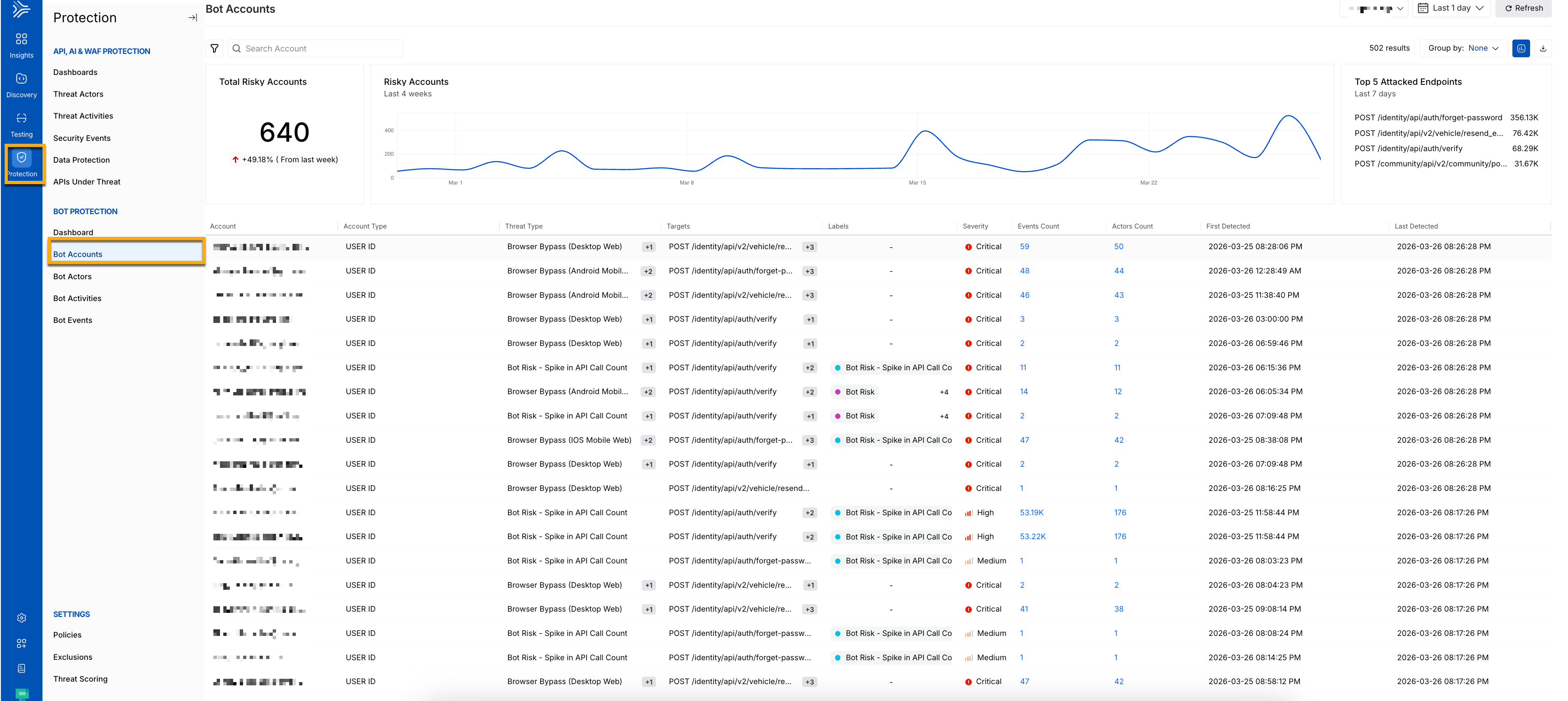
Bot Accounts Main Dashboard
Key components of the bot accounts dashboard
This section identifies and tracks accounts using attributes, such as user ID. When activity increases in frequency or severity, Traceable flags the account as risky. The following section gives you an overview of the metrics:
Total risky accounts — Number of impacted accounts.
Trend visualization — Activity changes over time.
Top attacked endpoints — The most attacked endpoints. These insights help you spot spikes, detect patterns, and identify ongoing attacks early.
When you drill into an account, you can review detailed evidence at the event level. You can examine request and response data and compare the activity against expected user behavior. This helps you understand how the attack works and confirm whether the activity is malicious.
On the same page, the following metrics provide a summary of account-level activity and help you assess the nature, scale, and impact:
Account — Indicates the source of activity using attributes, such as IP address, user agent, or device fingerprint. This helps you understand who is interacting with the account.
Account Type — Indicates how the account is classified according to the detection logic. This helps you determine whether the source is known, suspicious, or unknown.
Threat Type — Indicates the type of automated behavior detected, such as scraping or credential abuse. This helps you understand the nature of the attack.
Targets — Indicates the APIs or endpoints that it accesses. This helps you identify which application flows are being targeted.
Labels —Indicates contextual tags that enrich and categorize the activity. This helps add clarity and additional classification.
Severity — Indicates the risk level associated with the activity. This helps you prioritize investigation and response.
Events Count — Indicates the total number of events generated. This reflects the volume and intensity of activity. When you click an event count, you are redirected to the Bot Events page.
Actor Count — Indicates the number of actors involved. This helps you understand the scale of impact. When you click an actor count, you are redirected to the Bot Actors page.
First Detected — Indicates when the activity was first detected.
Last Detected — Indicates when the activity was last detected.
Filtering and grouping
You can filter and group different bot accounts for better analysis. This helps you understand the impact, prioritize response, and uncover the impacts. Use sorting and filtering to focus on the most relevant accounts. This helps you understand impact, prioritize response, and uncover how it affects you, aiding in identifying high-risk accounts. You can refine your analysis using the following options:

Filter and Grouping Options
Select the environment you require from the Environment drop-down.
Choose a specific period to analyze threats using the Time filter.
Organize accounts by threat type or target using the Group By option.
Filter (
.png) ) and sort based on investigation needs.
) and sort based on investigation needs.Export data (
.png) ) for further analysis.
) for further analysis.
You can then drill down into any account for detailed investigation.
Drill down into a bot account
After you identify an account, you can analyze behavior at a granular level. This view helps you understand how the account operates and the extent of its impact. The account detail view highlights attributes, such as targeted APIs, associated accounts, severity, and behavioral indicators. It also provides contextual insights into how the activity is detected and why it is considered suspicious. The following metrics provide insights about a specific account:
Total Events — Total number of bot events generated by the account.
Total Devices — Number of devices linked to the account.
Total IPs — Total number of IP addresses detected.
Active Duration — Time span over which the actor remains active, the difference between the first and last detected time.
You also gain access to event-level evidence, such as request and response data, timestamps, and account attributes, enabling detailed analysis of how the automation operates. You can get a more granular level understanding of the bot accounts from the Activity and the Radar tabs below.
The Activity tab provides detailed account metrics, helping you dive deep into analysis. The following metrics provide deeper visibility into account-level activity:
Activity — It represents the detected behavior patterns associated with the account, helping you quickly understand the type and nature of automation affecting it.
Endpoint — It represents the APIs or application endpoints accessed, allowing you to identify which flows are being targeted.
Events — It represents the total number of events generated for the account, indicating the volume and intensity of activity.
Actors — It represents the number of distinct entities interacting with the account, helping you determine whether the activity originates from a single source or multiple coordinated sources.
Last Seen — It represents the most recent activity timestamp, showing whether the activity is ongoing.
AI Summary — It generates a concise interpretation of observed behavior, providing a quick overview of patterns and potential intent.
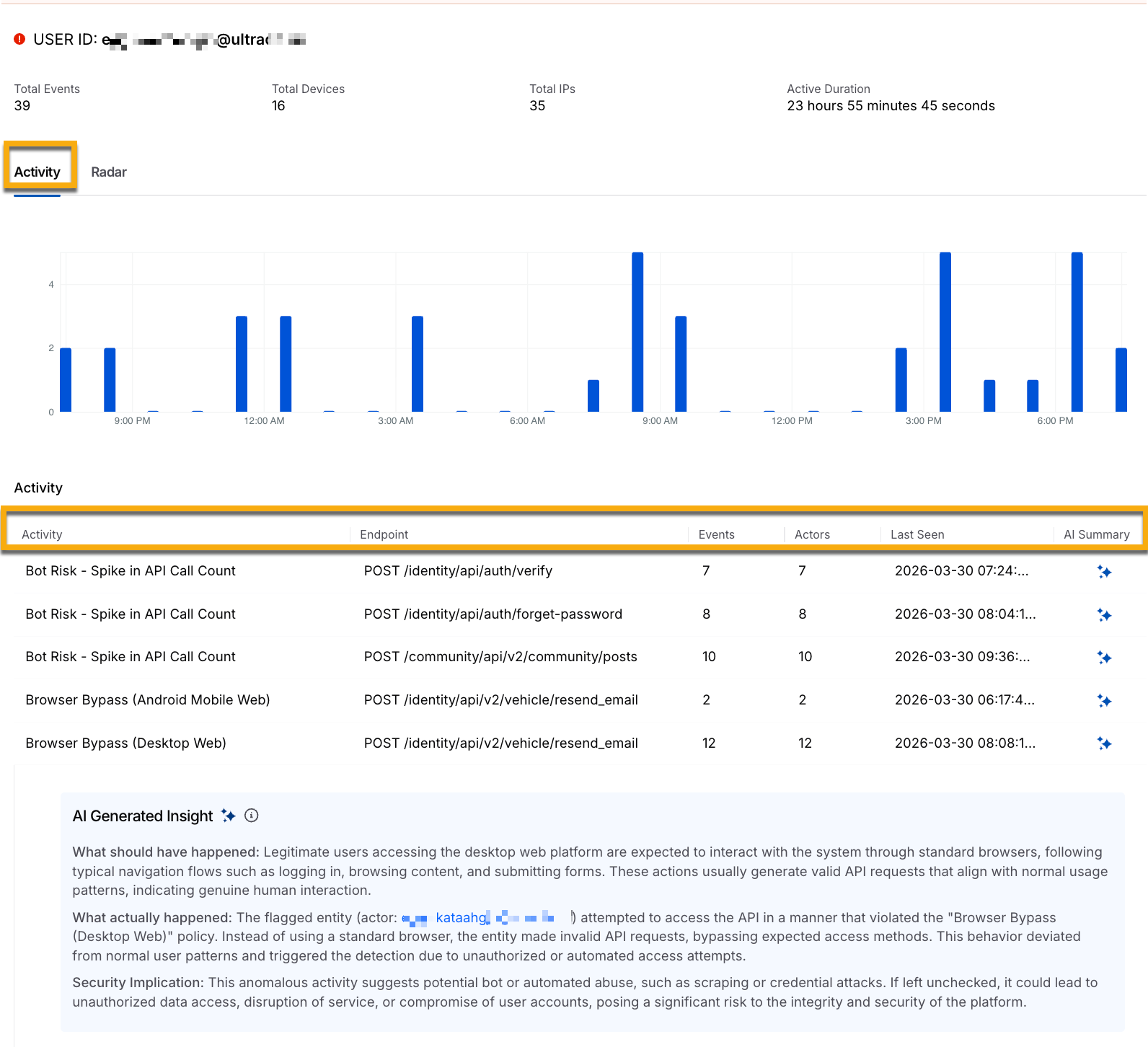
Bot Account Detailed View Activity Tab
This view helps you move from identifying impacted accounts to understanding the depth, pattern, and intent of the activity, enabling more effective investigation and response.
The Radar tab helps you identify the primary source account from where the bot attack started. It shows you the sequential network of connected accounts involved in the attack. You can filter accounts by account type, threat type, and target. The following screenshot shows the different detected accounts flow:
.png)
Bot Account Detailed View Radar tab
The flowchart contains the following table, which displays the components of the flowchart at each level:
Primary Account | Connected Accounts | Activity Overview |
|---|---|---|
User ID — Unique identifier of the primary account. Active Duration — Total time the account is active. Devices Used — Devices associated with the account. Total Events — Total number of recorded events. | User ID — Identifiers of linked or related accounts | Activities — Activities associated with the threat that violate bot policies. |
This helps you analyze the connected accounts and track any suspicious activity across them.
Investigate a bot account
Bot activity does not appear as a single signal. It surfaces through repeated attempts, anomalous request behavior, and coordinated activity across accounts. The investigation focuses on identifying patterns, narrowing the scope, and validating activities with evidence. You can follow the steps to investigate bot accounts more efficiently, enabling you to identify attacks more effectively.
Step 1 — Identify accounts that require attention
On the Bot Accounts page, accounts are listed with severity, event volume, and actor count. Scan the dataset to identify accounts that stand out due to activity spikes, recurring threat types, or irregular time patterns. Prioritize high-severity accounts and those with large event volumes. Use the actor count to determine whether the activity is isolated or distributed, as a higher number of actors indicates potential coordination.
Step 2 — Analyze account activity in context
Open the account detail view to examine activity over time. Use the timeline and event distribution to understand how activity evolves, including continuous traffic, burst patterns, and API coverage. Repeated authentication attempts, access to sensitive flows, and deviations from baseline usage indicate abnormal behavior and help distinguish suspicious activity from expected usage.
Step 3 — Correlate activity with bot actors
Move to bot actors to understand how the activity is attributed. Determine whether a single actor targets multiple accounts or multiple actors target a single account, as these patterns indicate different attack strategies. Compare shared attributes, such as IP patterns, request structures, and behavioral consistency, to establish relationships between actors and accounts.
Step 4 — Validate findings with event data
Drill down into event-level data to review activity in detail. Analyze requests and responses, including payloads, response codes, and failure patterns, to determine intent. Repeated authentication failures and structured request sequences indicate automated activity. Distinguish malicious behavior from legitimate automation, such as integrations or testing traffic, before taking action.
Step 5 — Assess impact and scope
Assess how far the activity extends across the environment by evaluating event frequency, duration, and the number of affected accounts or APIs. Determine whether multiple actors are involved to understand if the activity is coordinated. Broader distribution and longer duration indicate higher impact and help prioritize response.
Step 6 — Identify patterns across accounts
Expand the analysis to identify related activity across accounts. Use filtering and grouping to detect similar behavior, shared threat types, and common actors. Repeated patterns across accounts indicate campaign-level activity rather than isolated incidents and help connect findings into a broader attack pattern.